
CloudX · Enterprise Desktop Virtualization Platform

CloudX: Korea's Leading Cloud PC Solution

Essential for contactless work and protecting corporate data. Access your own PC environment anytime, anywhere with CloudX. Security Anywhere!

Why Softworks

How Softworks Delivers CloudX

01

Official CloudX Implementation Partner

CloudX is developed and operated by SK Broadband, and Softworks is the official partner that has deployed it in customer environments. We are not a distributor reselling the product, but an implementation organization that designs customer environments together with the service provider.

02

We Developed the Admin Portal

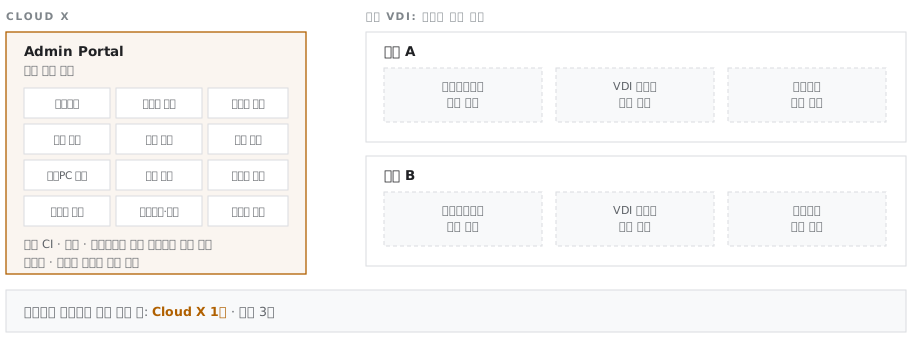
We operated and enhanced the SK Broadband Cloud PC Admin portal. CloudX supports per-customer customization of the Admin Portal, and Softworks is the organization that has actually implemented that customization. Foreign VDI products require switching between hypervisor management tools, broker management tools and separate portals; CloudX is operated from a single Admin Portal screen.

Single management tool vs. multiple management tools
03

Meets Public Sector Requirements in Both Product and Process

The product holds a Security Function Certificate from the National Intelligence Service (NIS) and GS Certification (Grade 1), and meets government-recommended Cloud Native requirements including MSA, containers and autoscaling. Procurement is shortened through the Multiple Award Schedule (MAS) contract on the Public Procurement Service (PPS) Digital Service Mall.

04

A Practical Alternative to Foreign VDI License Risk

We design migration scenarios that run foreign VDI and CloudX in parallel or separately by user group. Our experience deploying both platforms informs the placement criteria for each group.

Scope of Work

From assessment to operations: what Softworks covers

Assess

Assessment

Define goals (remote work, network separation, business continuity) · Measure current endpoint and network environment · Run real-hardware PoC and validate quality · Size target users · Review procurement options

Design

Design

Formula-based server and storage sizing · Platform architecture and end-to-end redundancy · Separation of service, management and storage networks · Authentication integration (SSO · 2FA · HR DB) · Security policy design · Admin portal requirements definition

Build

Deployment

Platform deployment · Management portal customization · Integration with business systems and network-linking systems · security conformity verification and vulnerability remediation

Migrate

Migration

Phased migration by group · Parallel operation management · Retrieval of existing physical PCs

Operate

Operations

Portal operations · User account and resource management · Regular reports · On-site stabilization support

Knowledge Base

We measure your current environment before kickoff and size the system by formula

Half of a VDI migration's success is decided before the project starts. On large migration projects, Softworks spends several months assessing the current environment before design begins, including about a month validating quality through a PoC on real hardware. Sizing without evidence leads to cost overruns or poor performance later.

  • Real-Hardware PoCValidation on actual management servers, operations servers and storage
  • Standard Sizing DesignDocumented rationale, down to consolidation ratios and headroom
  • Public · Finance · HealthcareTrack record with industry-specific regulatory requirements
  • Admin Portal DevelopmentHands-on experience down to the platform internals

Accumulated Assets

  • PoC validation checklist (servers · storage · network · application compatibility)
  • Network bandwidth baseline per user (approx. 200 Kbps)
  • Based on standard VM specifications (70 GB OS disk, allowing for Windows 11 upgrades)
  • User experience baseline (virtual PC login in about 20 seconds)
  • Server count formula (concurrent VMs × standard spec ÷ server capacity)
  • Consolidation ratio criteria and CPU headroom rationale
  • Effective storage capacity sizing (RAID · deduplication · reserve · snapshots)
  • VDI zone placement pattern for network-separated environments
  • Security conformity verification process (scheduled at project kickoff)
Field Issues

7 common problems in the field

Challenges in the FieldThe Softworks Approach
“Foreign VDI license costs are out of control”Unlike foreign VDI licenses that must be renewed every year, CloudX comes with a perpetual license you own after a single purchase. This sharply reduces the renewal costs that pile up year after year and lowers long-term infrastructure operating budgets
“A new deployment adds server license costs just for account management”Both account models are supported. If you already run Active Directory, we integrate with it as is; for a new deployment, a Non-AD design can reduce Windows Server licensing costs for AD. We decide after reviewing the organization's existing authentication system
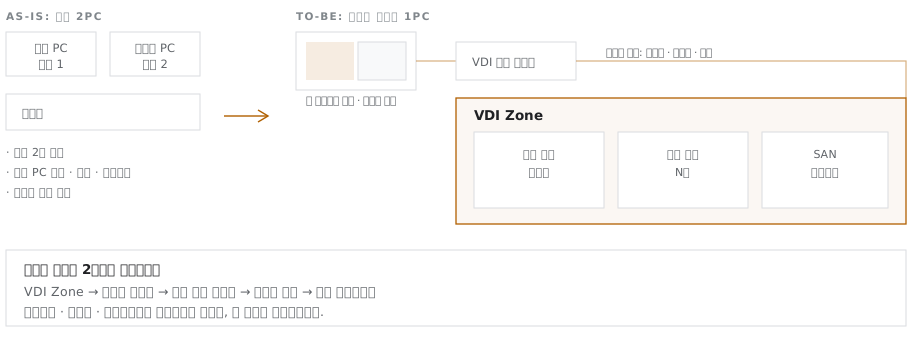
“Running two physical PCs per user is inefficient”Move to logical network separation, with separate work virtual PC and internet environments on one device. Provisioning, retrieval and maintenance are handled centrally
“We must prove we meet public sector security requirements”Built on a product that holds the NIS Security Function Certificate, GS Grade 1 and CSAP, we deliver configuration evidence for each control item as a deliverable
“Public sector procurement is complicated”Shorten procurement through the Multiple Award Schedule (MAS) contract (CLOUDX 2.0) on the PPS Digital Service Mall
“The standard admin console doesn't fit how our organization operates”We customize the Admin Portal to fit each organization's operating model. We have hands-on experience developing and enhancing the SKB Cloud PC Admin portal
“We lack remote work seats during emergencies and disasters”We design normal-operation seats and emergency seats separately, and expand when needed

“Running two physical PCs per user is inefficient”

VDI zone placement for moving from two physical PCs to one PC with logical network separation
Vendor Insight

CloudX = VDI + Cloud Infrastructure

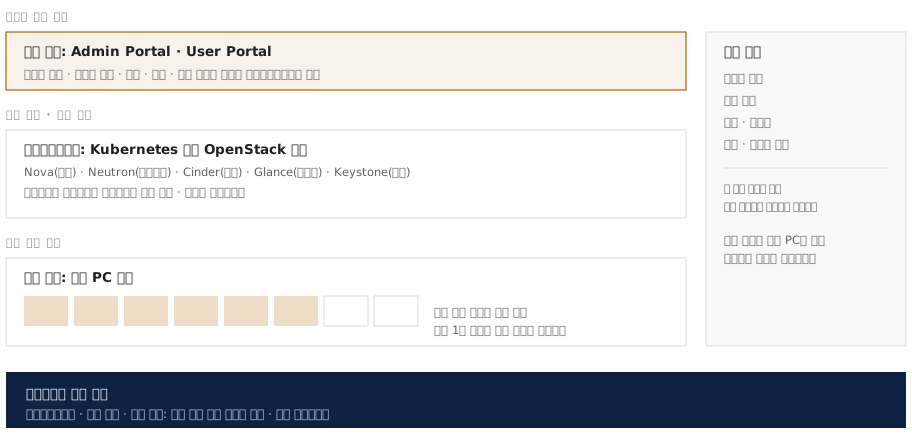
CloudX is not a standalone virtual PC product but VDI running on OpenStack and Kubernetes. Post-deployment operations therefore cover the entire cloud infrastructure, not just virtual PCs, and deployment and operations require dedicated specialists. Softworks covers that scope.

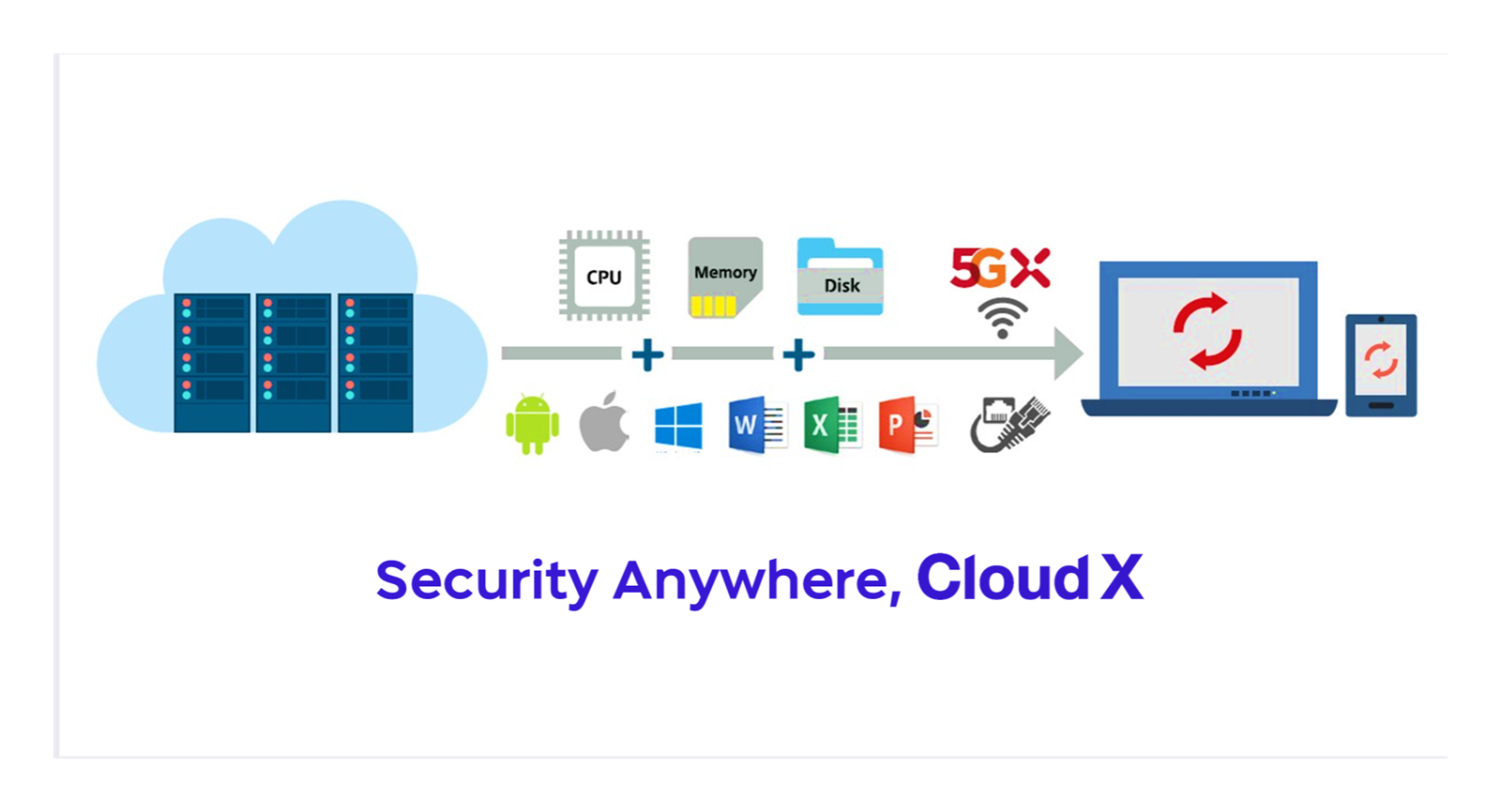
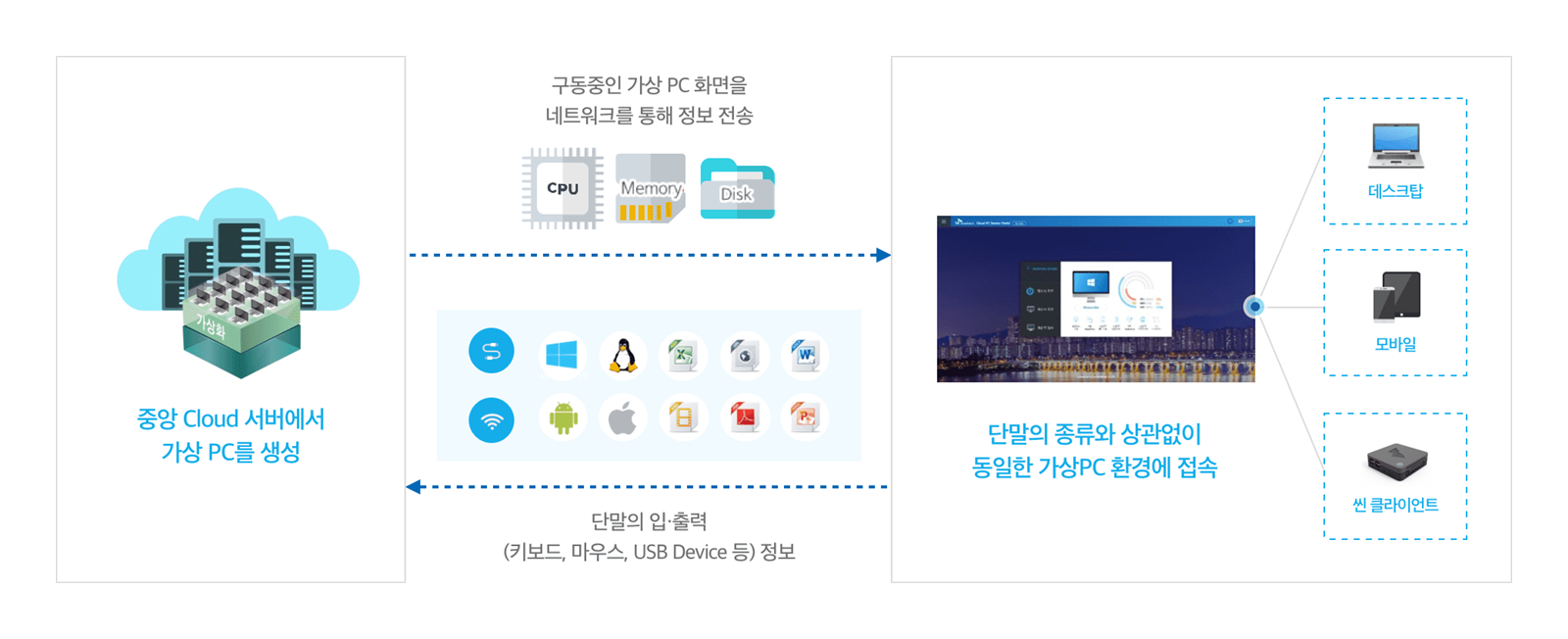
Any endpoint receives the same environment from central server resources
Softworks' scope covers the four planes of CloudX and the entire layer beneath the portal

Our track record and support structure to date

  • 32Sites in operation19 on-premises · 13 as-a-service
  • 16,000+Virtual PCs in operationCumulative
  • 4Product certificationsSecurity Function Certificate · DaaS · GS Grade 1 · CSAP
  • 120+Vendor support staffBusiness and development · Dedicated operations · Development specialists

Product Certifications

CategoryFeatureDescription
SecurityNational Intelligence Service (NIS) Security Function CertificateObtained for CloudX V2.0 as a virtualization management product; baseline evidence required in public sector procurement reviews.
CloudDaaS CertificationObtained after an audit of 110 items across 14 categories.
QualityGS Software Quality Certification (Grade 1)Obtained for CloudX V2.0; a prerequisite for procurement registration.
CloudCSAP Cloud Security CertificationBuild a dedicated zone for your agency on a certified cloud environment.

SourcesFigures are from the SK Broadband CloudX introduction, Ver1.6 (2024.04), and the SKT Enterprise CloudX product summary. The logo and concept diagram are from the SK Telecom Enterprise product summary; the service architecture diagram is from the CloudX introduction published on the NAVER Cloud Platform Marketplace.

Components

The six components of CloudX

For a virtual PC to start securely, the portal, authentication, broker and execution nodes must work together in sequence. Softworks controls how each component interacts and carefully designs the following key elements.

01

Admin Portal

All Administration from a Single Portal

Includes Dashboard, User Information, User Support, Portal Management, Policy Management, Service Management, Virtual PC Management, Tenant Resources, Template Management, System Resources, Monitoring Statistics and Admin Settings. Super Admin and Tenant Admin roles separate operational responsibilities, and the widget-based dashboard can be configured per administrator.
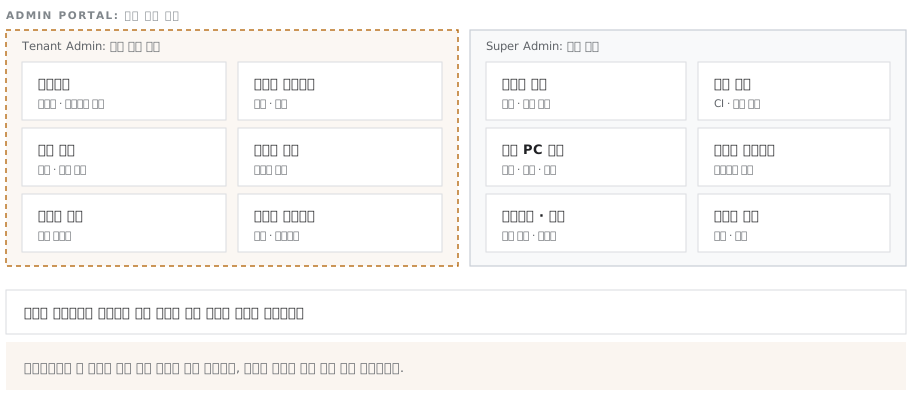
12 management menus with Super Admin and Tenant Admin permission boundaries
What Softworks Does

For the specific environments of customers and public institutions, we develop and deploy automatic account synchronization with existing HR systems, multi-factor authentication (MFA/2FA) integration and organization-specific features, and design tenant administrator permissions to match the organizational structure.
02

User Portal

VDI That Starts from a Browser

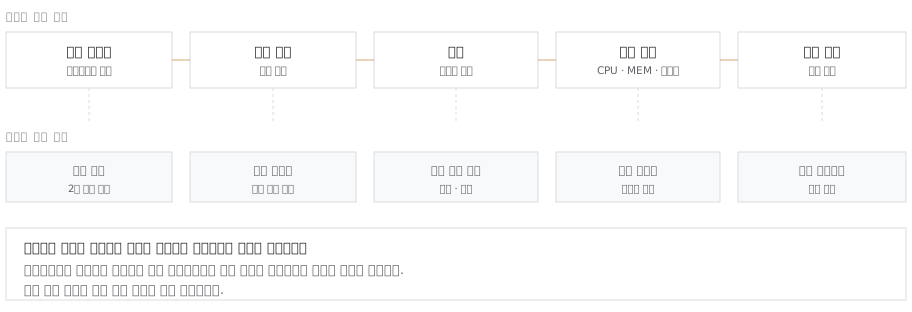
Users launch virtual PCs securely with a single portal login. From the portal, they can control virtual PC power, check real-time resource usage (CPU, memory, disk), and download the access client and user manuals.

The five-step user journey and the controls administrators hold at each step
What Softworks Does

The more users can handle on their own, the fewer simple inquiries and requests reach the IT help desk. Softworks designs the scope of user self-control, virtual PC power schedules and session timeout behavior to fit the organization's operating policies.

03

Access Control Layer

Strong security through full separation of the authentication path and the display transmission path

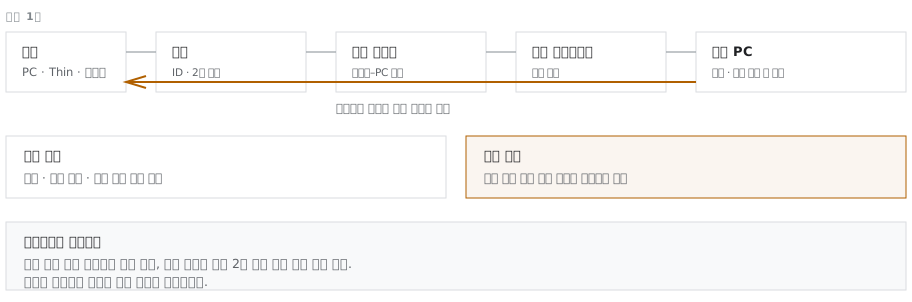
An authentication service handles portal login and a connection broker assigns resources, each with a distinct role. Virtual PC access runs through a session gateway, and only encrypted display output is sent to the user's device. In a VDI environment, sensitive data is never stored on the device; it stays secure in the central data center.

Only screen output goes to the endpoint; only keyboard, mouse and peripheral input goes to the data center
The authentication, broker, session gateway and display transmission path that each connection passes through
What Softworks Does

Integrates with the organization's existing authentication systems (SSO, internal accounts and more) and applies security policies suited to each access environment. Security control points at every access segment block unauthorized access.

04

Resource Operations

Pre-creates virtual PCs and restores them to their initial state after use

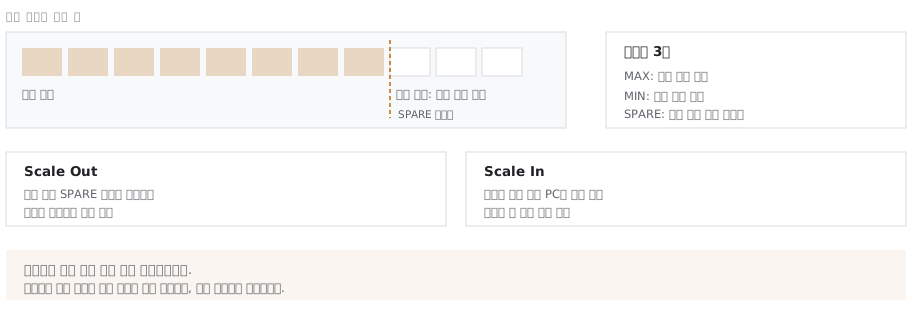
Virtual PCs are created from a single golden image and restored to their initial state when the session ends. The standby pool grows and shrinks automatically based on thresholds, so users are assigned a PC immediately without waiting.

Threshold-based automatic Scale Out / Scale In (thresholds set per project)
What Softworks Does

When users log in all at once at the start of the workday and virtual PCs are not assigned immediately, users have to wait. Keep too many in reserve, and system resources go to waste. Softworks analyzes each agency's actual login patterns in detail to set the optimal standby pool size and auto-scaling thresholds. The result: no wasted resources and no waiting, even at the morning peak.

05

Redundant Configuration

High Availability (HA) Through Full Redundancy and Network Separation

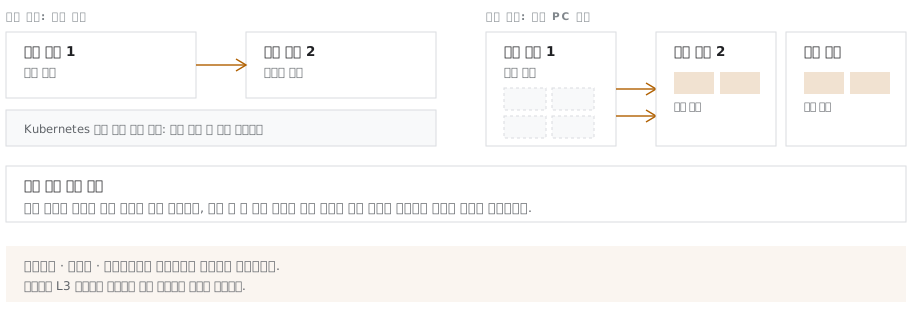
Softworks' VDI infrastructure makes every core control layer redundant, so it fails over automatically to a healthy server when a failure occurs. If a physical server fails, running virtual PCs move automatically to other servers with sufficient resources to keep work going. Service, management and storage networks are also physically separated to prevent load interference and strengthen security.

Management-layer failover and virtual PC migration during a failure
What Softworks Does

Reserve resources to absorb failover are secured at the design stage. The key is setting the consolidation ratio so the remaining servers can absorb the load even if one server fails.

06

Security Policy

Comprehensive Security with Fine-Grained Policy Control

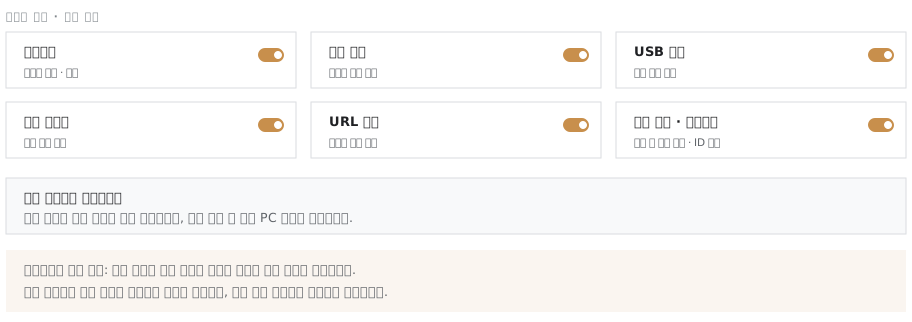
Administrators can easily control security settings such as clipboard, file transfer, USB ports, local printing and URL redirection. All communication is encrypted by default, the virtual PC area is automatically masked during screen capture attempts, and watermarks further protect against data leakage.

Policy control items and coverage of six security domains
What Softworks Does

We map the organization's security regulations to VDI policies for tailored security controls by organization and group. File import and export are linked to electronic approval workflows in the portal to prevent unauthorized leakage, and we provide evidence ready for future security audits.

Solution at a Glance

CloudX

CloudX is a virtual PC (VDI/DaaS) platform developed and delivered by SK Broadband. Among proven virtual PC solutions, it is the only one developed in-house by a major Korean enterprise.

Security

NIS Security Function Certificate · GS Certification (Grade 1) · CSAP Cloud Security Certification · Per-user USB / file transfer policies · Two-factor authentication · Screen capture prevention

Core Technology

Developed independently with Korean DaaS core technology, with no dependence on foreign virtualization technology

Architecture

Built on OpenStack + Kubernetes · MSA architecture · Non-disruptive scale-out · End-to-end redundancy

Operations

Admin Portal included, with per-customer customization · Single management tool

Endpoints · Infrastructure

In-house Thin Client · Support for a wide range of devices, including Mac OS · Integrated network infrastructure

References

Customer References

Customer TypeProjectsDeployment Configuration
Platform Provider · SK BroadbandCloud PC Admin portal operations and enhancementPlatform Development · Operations
Public Sector · Energy Public EnterprisesDeployment and expansion of a virtualization system for remote workExpansion
Enterprises · Cloud Service Providers (CSPs)VDI deployment for remote access by internal engineersRemote Access for Engineers
Finance · SecuritiesInternet VDI deployment to meet network separation requirementsNetwork Separation
Operation & Support

On-Site Support Continues After Deployment

After the project ends, dedicated staff remain on site for a set period to support stabilization, followed by a warranty period. On-site staff handle incidents first; unresolved issues are escalated step by step to the implementation team and the vendor's engineering organization.

  • Dedicated on-site staff during stabilization
  • Tiered Level 1 / 2 / 3 incident response
  • Single point of contact; first-level handling by on-site staff
  • Failure history logged to the database and fed back into inspection items
  • Scheduled Preventive Inspections
  • Managed Admin Portal operations
  • User Account and Resource Management
  • Advanced Admin Portal feature development
  • Procurement Contract Renewal Support

We combine solutions from global technology leaders with Softworks' deployment and operations expertise to power our customers' digital and AI transformation.

Validate Your Move to Korean VDI with a Real-Hardware PoC

We start together by measuring your current environment and reviewing procurement options.

Request a Consultation →