VMware vSphere Kubernetes Service (VKS) · VMware Kubernetes Deployment & Management Platform

Unified operation of VMs and containers
starts with sound architecture design

The key to running virtual machines and containers efficiently on the same infrastructure is careful design. VKS (vSphere Kubernetes Service) lets you deploy Kubernetes clusters quickly and securely on your existing vSphere resources. A successful adoption, however, takes more than applying the technology: it requires a clear division of roles based on the nature of each workload. Drawing on its infrastructure engineering expertise, Softworks works with you from day one to determine which workloads are best placed on VKS. We eliminate trial and error in a complex container infrastructure transition and deliver a stable, scalable, modern cloud environment.

Why Softworks

How Softworks approaches VMware vSphere Kubernetes Service

01

We treat Kubernetes and VKS as a core technology area in its own right

Softworks treats Kubernetes infrastructure deployment and operations as a dedicated core business. While most virtualization providers treat VKS as an add-on feature, we have built deep expertise in advanced container environments, including centralized management of large numbers of clusters and GPU resource partitioning. We carry out enterprise VKS transitions grounded in deep technical capability, so that vSphere and VKS work together for the best performance.

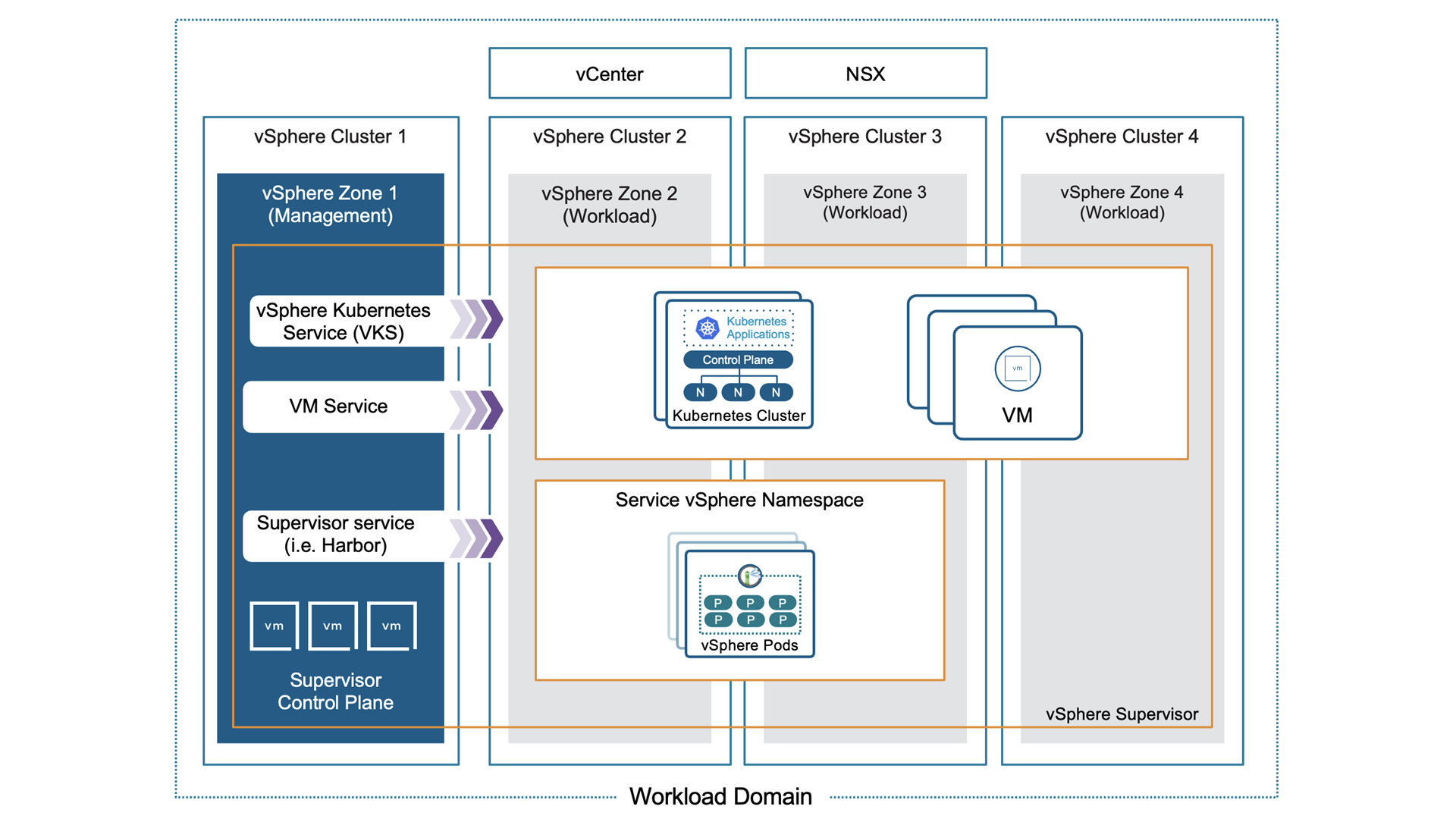
The Supervisor within a workload domain, with namespaces and clusters running on top
02

From workload analysis to optimal placement, we provide clear criteria

Moving every container workload to VKS is not always the right answer. Softworks goes beyond simple migration and clearly separates the workloads that should stay on existing Kubernetes environments from those that run most efficiently when consolidated onto VKS (vSphere resources). Drawing on years of engineering know-how, we provide workload placement guidelines that weigh stability, cost, and ease of operations.

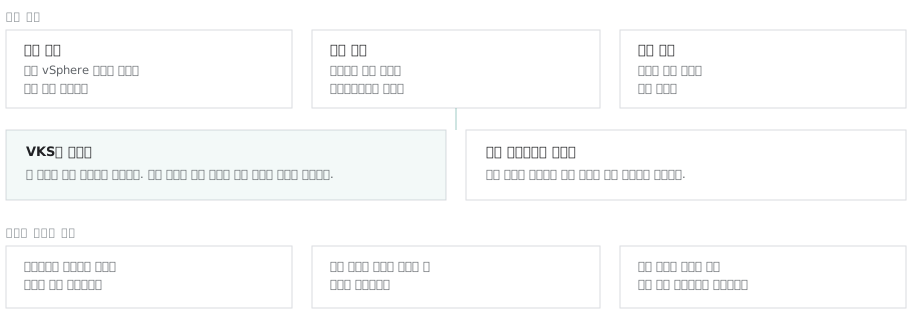
Three criteria for deciding whether container workloads belong on VKS or on separate clusters
03

We assess the compatibility of your existing TKG environment in detail and deliver a successful transition to VKS

As Tanzu Kubernetes Grid (TKG) has been folded into the new vSphere Kubernetes Service (VKS) framework, API specifications and resource definitions have changed. Softworks performs a detailed compatibility assessment to confirm that the infrastructure configuration and resources you used in earlier versions will work correctly in the latest VKS environment. Based on the findings, we adapt or redesign the existing architecture to current standards and deliver a VKS migration with no risk of disruption.

04

From virtualization to Kubernetes, one dedicated team owns it end to end

The stability of VKS (vSphere Kubernetes Service) ultimately depends on the design quality of the virtualization resources underneath it. When infrastructure and Kubernetes are handled as separate projects, accountability becomes unclear the moment an outage or performance issue occurs. At Softworks, a single dedicated team that understands both virtualization infrastructure and Kubernetes runs the project from start to finish. We eliminate the trial and error that arises at the boundaries between technologies and deliver a stable, modern infrastructure environment.

Scope of Work

From assessment to operations: what Softworks covers

Assess

Assessment

Container workload inventory · Assessment of existing Kubernetes environments · Placement criteria · TKG transition impact analysis

Design

Design

Supervisor and namespace design · Cluster sizing and node configuration · Storage class design · Network and access policy design · Backup integration design

Build

Deployment

Supervisor enablement · Cluster deployment and standard configuration · Registry and CI integration · Performance validation

Migrate

Migration

Workload migration · Conversion of existing TKG resource definitions · Phased transition plan and rollback criteria

Operate

Operations

Operations handover · Administrator training · Cluster lifecycle procedures · Connection to technical support

Knowledge Base

Creating clusters is easy. The real problem is sprawl

In Kubernetes, the real operational crisis comes not with a single cluster but after clusters multiply to meet each department's needs. Inconsistent Kubernetes versions and uncontrolled access rights and resource allocation are the biggest headaches for infrastructure teams. Softworks has built and operated numerous enterprise multi-cluster environments. We do more than create clusters: we build in design standards from the start of the project that fundamentally reduce operational complexity as you scale.

  • Multi-clusterExperience operating centralized management products
  • Isolation and permission boundaries by team and workloadNamespace partitioning criteria and quota patterns
  • LifecycleStandard version policies and upgrade procedures

Accumulated Assets

  • Container workload placement criteria
  • Namespace partitioning patterns (team · workload · environment)
  • Cluster sizing criteria
  • Storage class selection criteria
  • Version policy and upgrade procedures
  • Access permission design patterns
  • TKG migration checklist
  • Network range design criteria (management · workload · Pod · service)
  • Container image import procedure for air-gapped networks
  • PoC checklist (Supervisor · Namespace · Cluster · Deployment validation)
Field Issues

Six challenges commonly seen in the field

Challenges in the FieldThe Softworks Approach
“We don't know whether to keep container environments separate or consolidate them”Softworks recommends placement based on the technical characteristics of each workload and the structure of your operations team. If the main goal is to reuse existing virtualization resources flexibly and run everything from a single console, VKS (vSphere Kubernetes Service) is the clear answer. Specialized workloads that need their own deployment lifecycle or strict environment isolation, on the other hand, are better kept separate. We provide a clear placement architecture so you can maximize infrastructure efficiency without trial and error.
“Can we move our existing TKG environment over as is?”As TKG has been folded into VKS, release names and some resource definitions have changed. You must therefore verify in advance whether existing manifests can be applied as-is. Before starting the migration, Softworks thoroughly assesses the compatibility of the resources you use today. After clearly identifying what needs to change and the scope of impact, we provide the optimal migration sequence and remediation guide to minimize service disruption.
“Every team is adding clusters, and we can't keep them under control”Version confusion and management overhead from cluster sprawl are a chronic problem in enterprise IT operations. Softworks first discourages unchecked cluster growth and reviews design patterns that use namespaces within a single cluster to draw firm boundaries between teams and workloads. Where business requirements make separate clusters unavoidable, we establish strict version management policies and upgrade cycles before expanding.
“It's hard to define the backup scope for our container environment”Softworks uses an architecture assessment to define the most practical backup scope. We first separate stateful resources from stateless ones. We then designate persistent volumes (PVs), which must not lose data, and the configuration data needed to rebuild clusters (YAML · etcd) as independent protection targets. By integrating these with your enterprise backup system, we build a safety net that enables fast recovery even when failures occur.
“We're on an air-gapped network, so we can't pull container images from outside”In the air-gapped networks of tightly secured public and financial institutions, external public registries are unreachable, which makes obtaining and deploying container images a major obstacle. Softworks first builds a secure container image registry on your internal infrastructure and puts a governance process in place so that only images that pass security verification are registered through a defined import procedure. We also convert every external registry reference left in existing configuration files and Helm Charts to point to the internal registry, delivering an air-gapped deployment environment free of external connection errors and missing path settings.
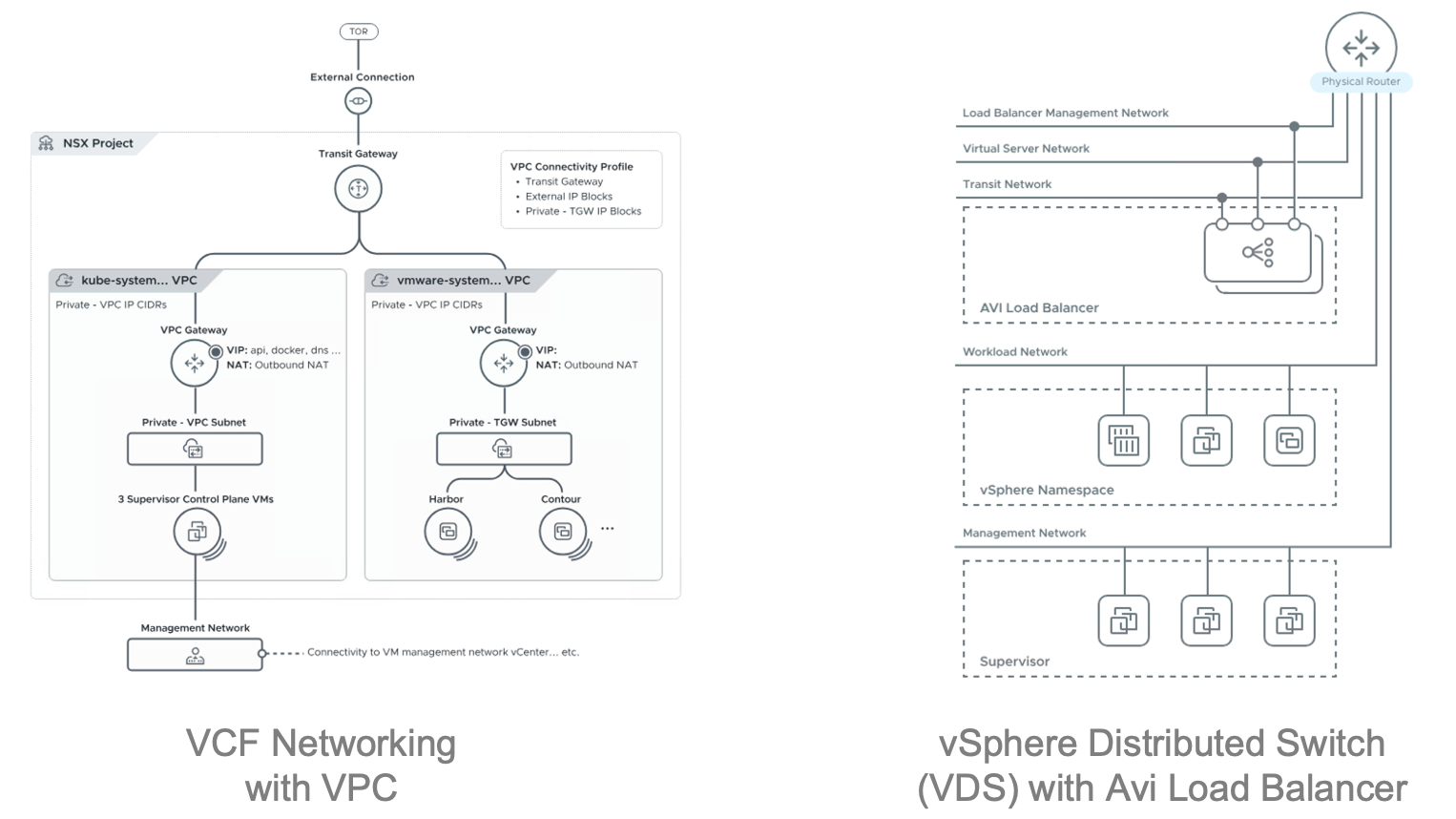
“Can we set this up without NSX?”As an alternative to NSX overlay networking, we offer a practical architecture that integrates an external load balancer with standard vSphere networking. Without NSX, however, there are technical limits on distributed firewall (micro-segmentation) settings and fine-grained, namespace-level network policies. Softworks does not push NSX by default. We objectively assess your actual security policies and budget in advance, determine whether standard networking is sufficient or NSX is a security requirement, and recommend the most cost-effective and secure networking path.

“Can we set this up without NSX?”

NSX configuration vs. vSphere networking with a load balancer
Components

The four components of vSphere Kubernetes Service

VKS adds a control layer on top of vSphere clusters to deploy Kubernetes clusters flexibly and manage them centrally. Softworks provides upfront reviews and architecture design guidance so that each core component delivers the best possible performance and stability.

01

Supervisor

Turns vSphere clusters into a Kubernetes control hub

Supervisor is the core capability that turns a vSphere cluster into a powerful Kubernetes control plane. Once Supervisor is enabled on a cluster, administrators can partition resources precisely by namespace and deploy Kubernetes clusters and traditional virtual machines (VMs) side by side on the same infrastructure. It removes the complexity of running two separate stacks and lets you operate virtualization and containers efficiently within one framework.
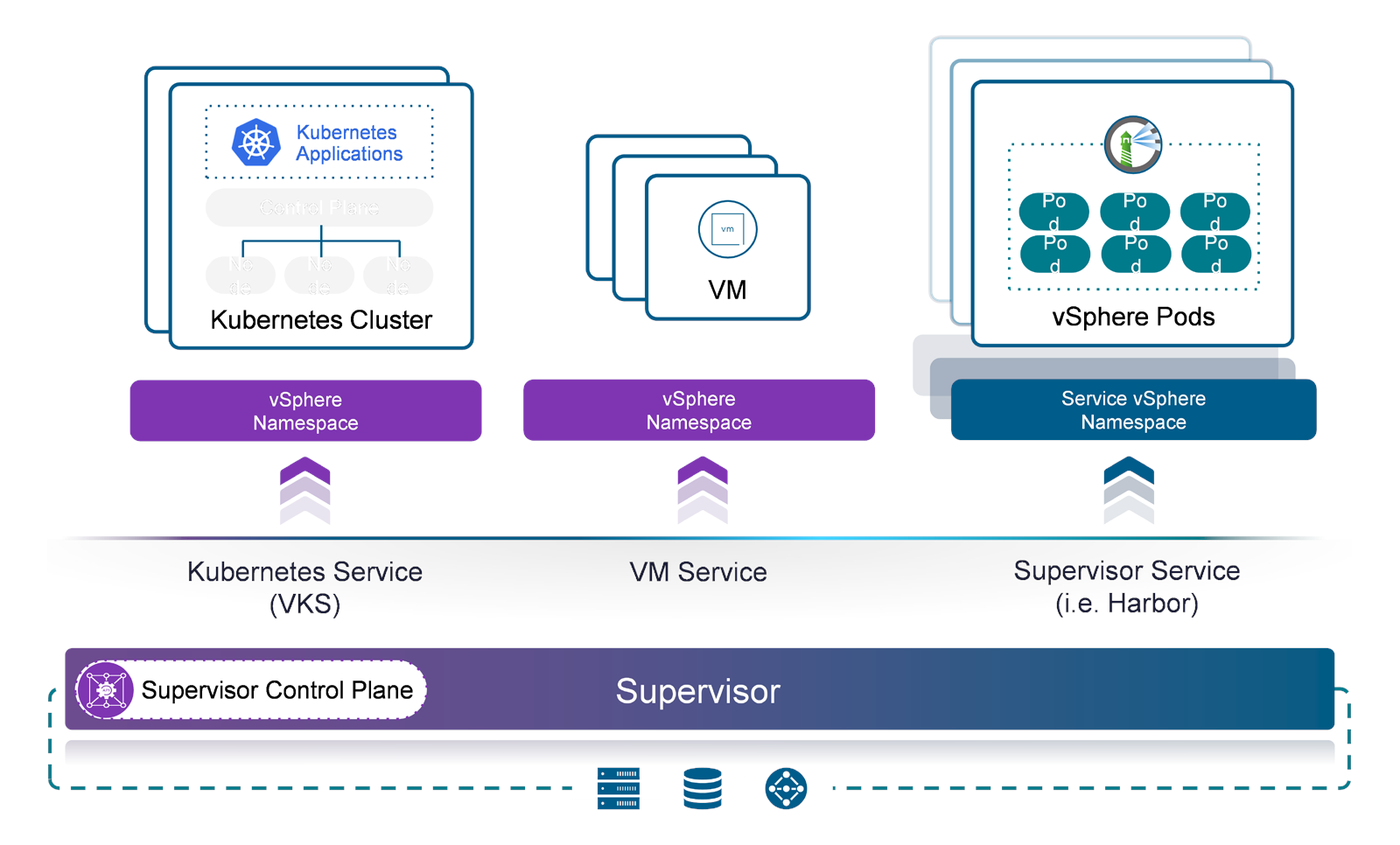
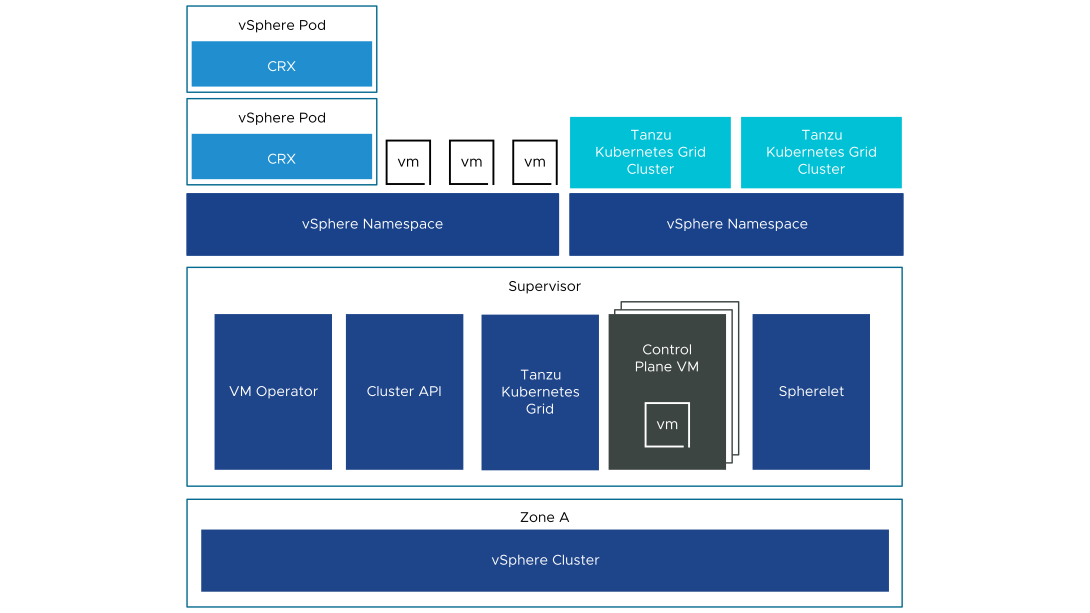
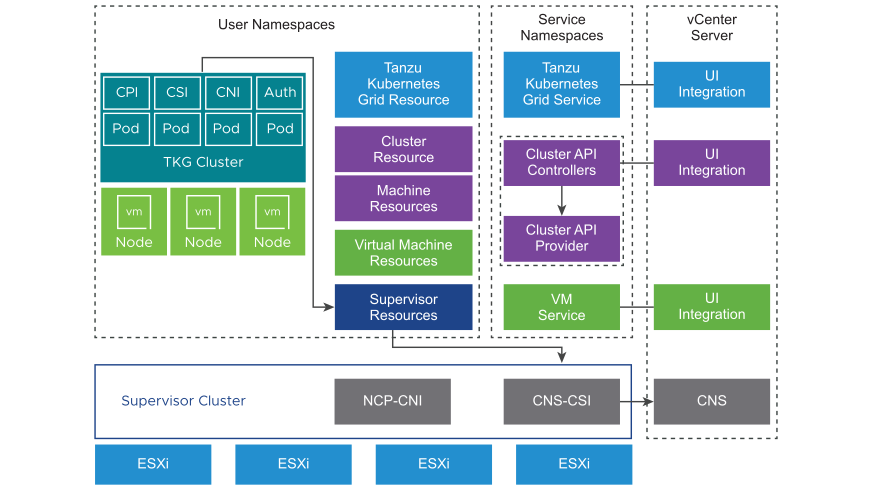
Kubernetes Service · VM Service · Supervisor Service on the Supervisor
Control plane VMs and the agents deployed on each host
What Softworks Does

Choosing which cluster to enable Supervisor on is the first step that determines the stability of your entire VKS environment. Enabling it on a cluster already running production workloads risks unexpected resource contention. At project kickoff, Softworks reviews your current resource headroom and the potential blast radius of failures from multiple angles. We then provide architecture guidance on whether to build a dedicated cluster or expand an existing one, based on what best fits your environment.
02

Namespaces · Resource Allocation

Set clear resource boundaries by team and workload

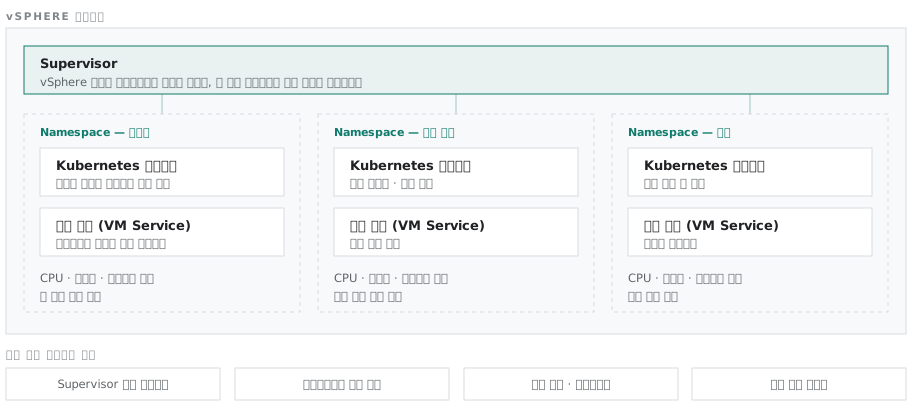
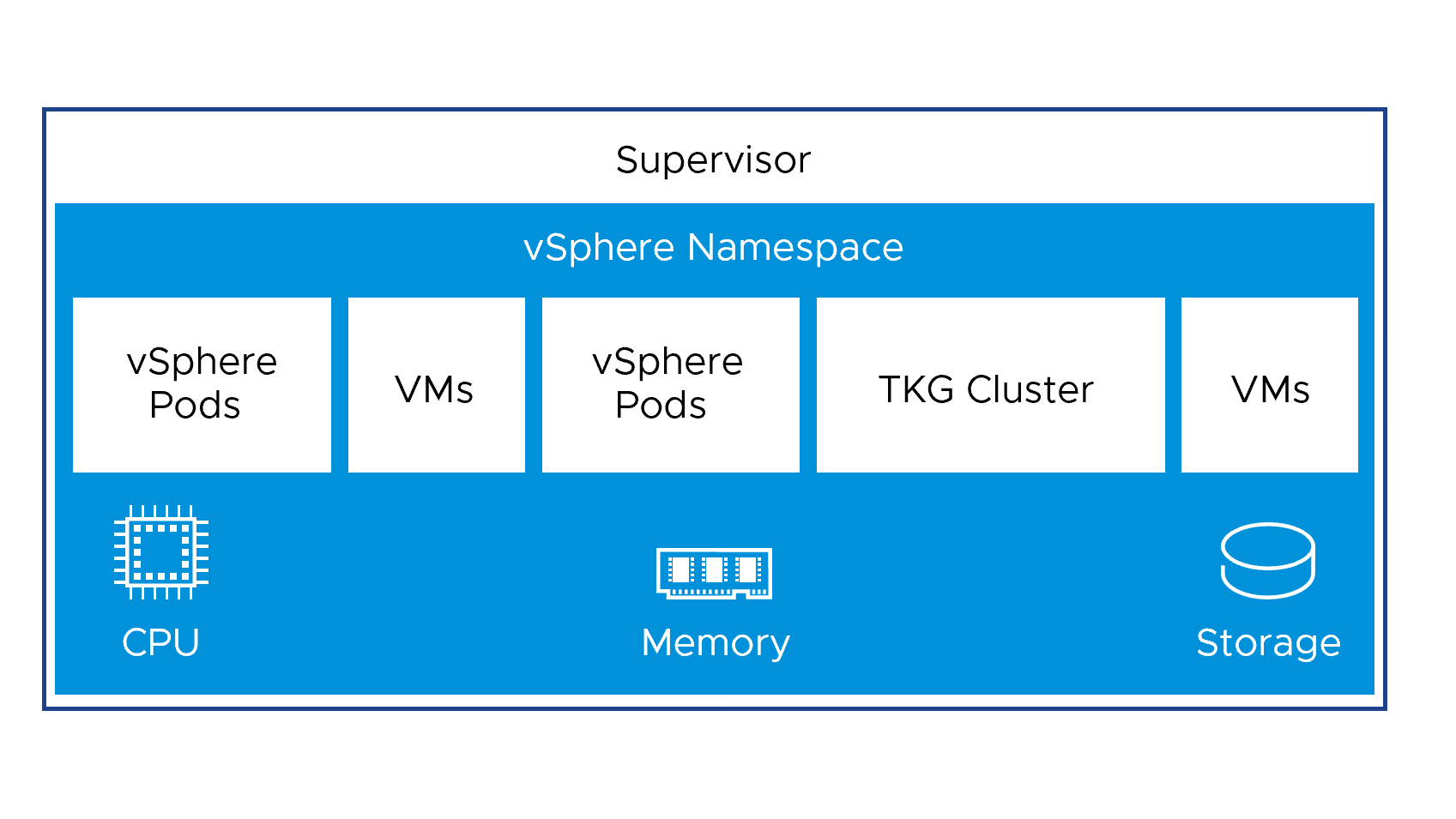
In a multi-tenant environment, what matters most is putting secure boundaries in place so that teams never encroach on each other's resources or permissions. In VKS, you can set CPU, memory, and storage limits and assign access permissions clearly for each namespace.

Namespace boundaries on the Supervisor, with clusters and virtual machines inside
Each namespace carries its own CPU, memory, and storage limits
What Softworks Does

Softworks recommends namespace partitioning criteria suited to the size and work patterns of your organization. Within this framework, development teams can create clusters freely within their allocated resources and move quickly. Our architecture guidance gives you both infrastructure control and developer convenience.

03

Kubernetes cluster deployment

Create and manage standardized clusters with ease

In VKS, you can immediately provision standard Kubernetes cluster nodes within a designated namespace using validated release versions. Every step, from initial cluster deployment to scaling, bug fixes and version upgrades, is driven by declarative definition files (YAML), making management dramatically simpler.

Internal components that handle cluster creation and scaling
What Softworks Does

Softworks defines node specifications suited to each service and a stable upgrade lifecycle in advance, creating a sustainable and secure cluster operating environment. Definition files are handed over to you as customer assets.

04

VM Service

Manage virtual machines the same way as containers

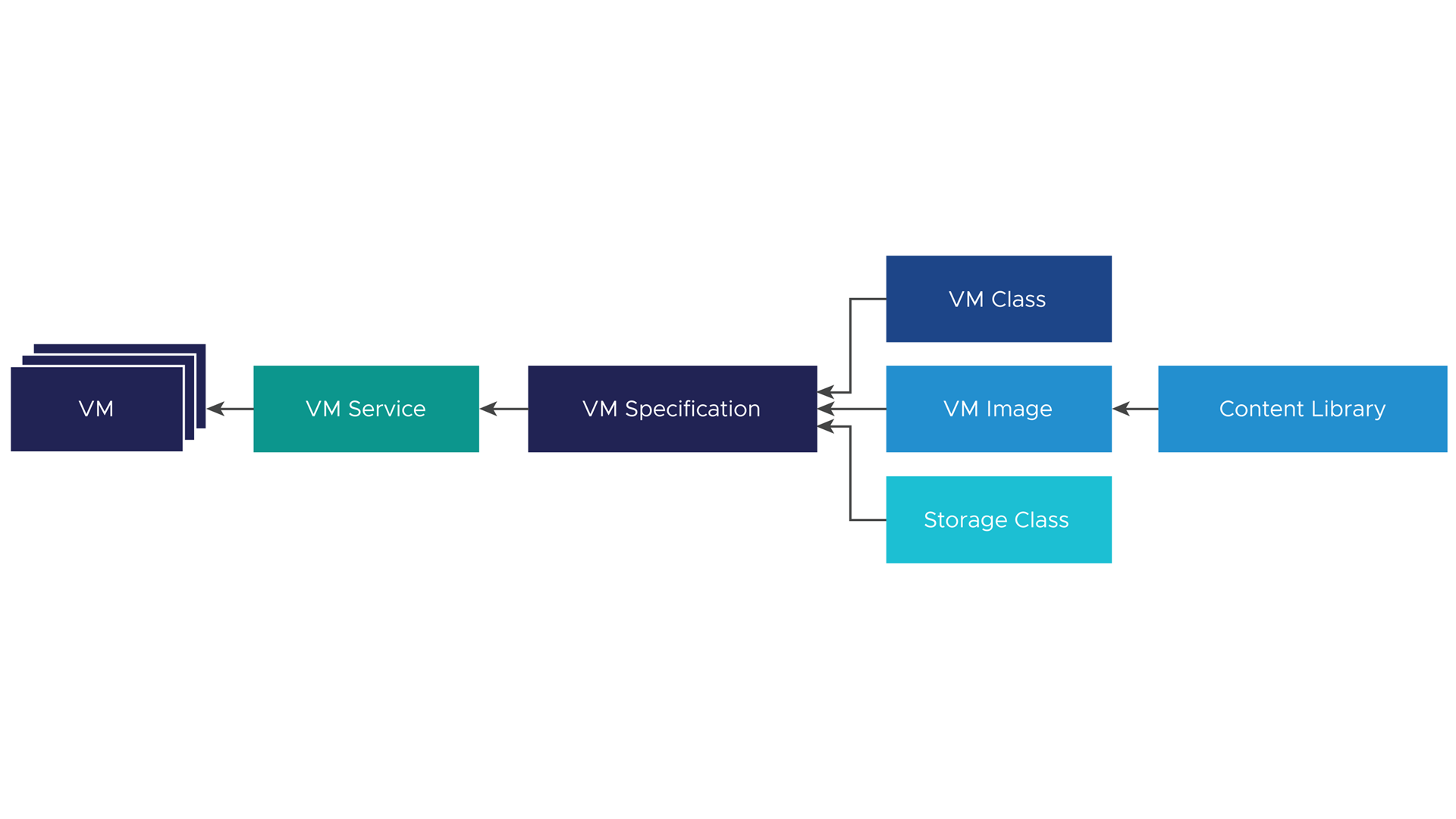
Even in a move to cloud native, some workloads cannot easily be ported to containers. VM Service lets you deploy virtual machines (VMs) quickly within the same namespace for these workloads. Because VMs and containers share the same resource quotas and access permission model, administrators can maintain consistent security and resource policies without managing two systems.

Creating a virtual machine by combining an image, a VM class, and a storage policy
What Softworks Does

Softworks precisely classifies which workloads should move to containers and which should stay on VMs. This protects existing assets while delivering a practical modern infrastructure in which virtual machines and containers work together.

SourceDiagrams used to describe the components are from Broadcom's official technical documentation; some have been redrawn by Softworks.

References

Customer References

Customer TypeProjectsScope of Work
Public Sector · Testing and Certification BodyDeployed an integrated Kubernetes operating environment within a live virtualization environmentSupervisor · Namespace · Container registry PoC
Operation & Support

Technical support continues after deployment

Kubernetes has short release cycles, so upgrades continue long after deployment. The engineers who performed the deployment stay on as your technical support contacts.

  • Regular cluster health checks
  • Version upgrade technical support
  • Namespace quota readjustment
  • First-level incident analysis and vendor escalation
  • Annual architecture review

We combine solutions from global technology leaders with Softworks' deployment and operations expertise to power our customers' digital and AI transformation.

Run your containers on virtualization

We review workload classification and Supervisor and cluster design with you.

Request a Consultation →