Architecture proven in finance, public sector and engineering, setting the standard for always-on VDI
From strict security on financial business networks to high-performance engineering workstations, Softworks has found what really works for VDI across many sites. Going beyond simple deployment, our designs are built on a full understanding of real user work patterns, delivering a solid work environment from first deployment to re-architecture that overcomes the limits of existing systems.
Why Softworks
How Softworks Delivers Omnissa Horizon
01
New deployments are standard; we also handle complex redeployments
We have delivered both new deployments and redeployments, including 1,000 VMs of business-network VDI for a life insurer, 400 VMs of internal desktop virtualization for a securities firm, and 600 VMs of virtual desktop infrastructure for an education administration agency. Our VDI expertise extends to the most demanding redeployments: replacing live environments without downtime or disruption to users.
02
Sizing based on measurements
During the PoC/BMT phase, we measure the CPU, memory, IOPS and concurrent access patterns of real user groups, reproduce boot storms and login storms, and then finalize sizing.
03
Includes regulatory compliance deliverables
Configurations and compliance evidence that address the Electronic Financial Supervisory Regulations and public sector network separation guidelines are included in the deployment deliverables.
04
User change management is part of the project scope
Half of VDI failures stem from user resistance, not technology. We include pre-migration communication, user training and intensive early-stage helpdesk operations in the project scope.
Scope of Work
From assessment to operations: what Softworks covers
Assess
Assessment
User group classification · Work profile analysis · Assessment of existing VDI issues · Regulatory requirements review
Design
Design
Sizing and redundancy design · Master image / Instant Clone strategy · Profile persistence scope definition · RDSH published apps · Session desktop design · Network separation and data transfer integration design · GPU allocation design
Group-by-group migration from existing VDI to new VDI · Parallel operation period management · Post-migration stabilization support
Operate
Operations
Regular image updates · User support · Performance monitoring · Capacity expansion planning
Knowledge Base
Setting VDI standards with criteria proven in the field
VDI infrastructure is not a one-time deployment; it requires ongoing operations and lifecycle planning. Through many new deployments and redeployments, Softworks has built practical decision criteria, from optimizing user groups and managing OS and application images to structuring migration phases. We apply the same criteria whether we are building a new environment or overhauling an existing one.
12 yearsof desktop virtualization deployments
Finance · Public · Research · EducationTrack record with industry regulatory requirements
New + RedeploymentExperience migrating existing VDI
PoC / BMTSizing methodology based on real measurements
Accumulated Assets
User group definition template by work type
Baseline resource usage patterns by group
Login and boot storm test scenarios
Criteria for separating master image apps from RDSH published apps
Security control mapping table by regulation
User migration guides · Training curriculum
Tier 1 / 2 / 3 incident response procedures
Field Issues
Six challenges commonly seen in the field
Challenges in the Field
The Softworks Approach
“The system cannot handle everyone logging in at 9 a.m.”
Finalize sizing with login and boot storm tests and design pre-provisioning policies
“Users keep complaining that it is ‘slower than a physical PC’”
Perceived performance metrics (login time and app launch time) are defined as SLAs, and tuning is based on measured values
“We clean up accounts manually after every personnel change”
DB-to-DB integration with the HR database synchronizes organization and user data automatically once a day. Where integration is difficult, an Excel import path is provided as well
“Our VDI cannot handle design apps and GPU workloads”
Engineering VDI is designed as a separate pool, assigned GPU profiles and then validated
“Interpreting network separation regulations and handling audits is a burden”
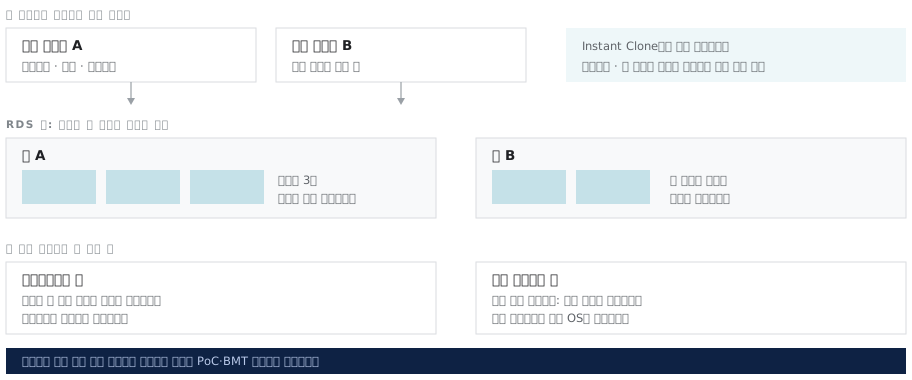
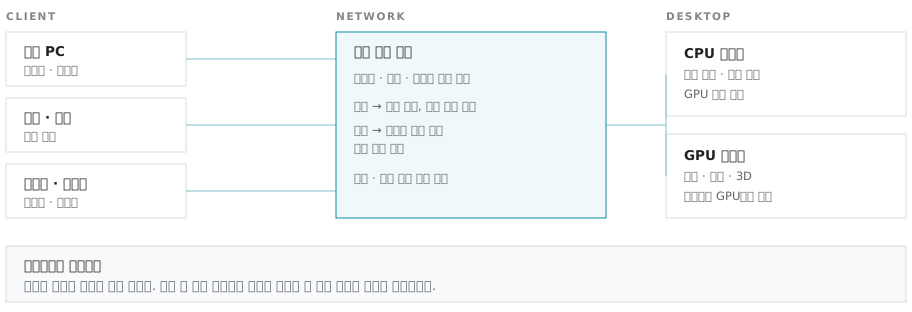
We first determine whether the requirement is internet network separation or business network separation, then design pool configurations and blocking points to match the regulatory provisions. Designs draw on our finance and public sector deployments and come with audit evidence deliverables
“Support has been uncertain since Omnissa was spun off”
Softworks, which has deployed and supported VDI for 12 years, handles first-line support directly. Even if the vendor's support structure changes, support continues through the same point of contact
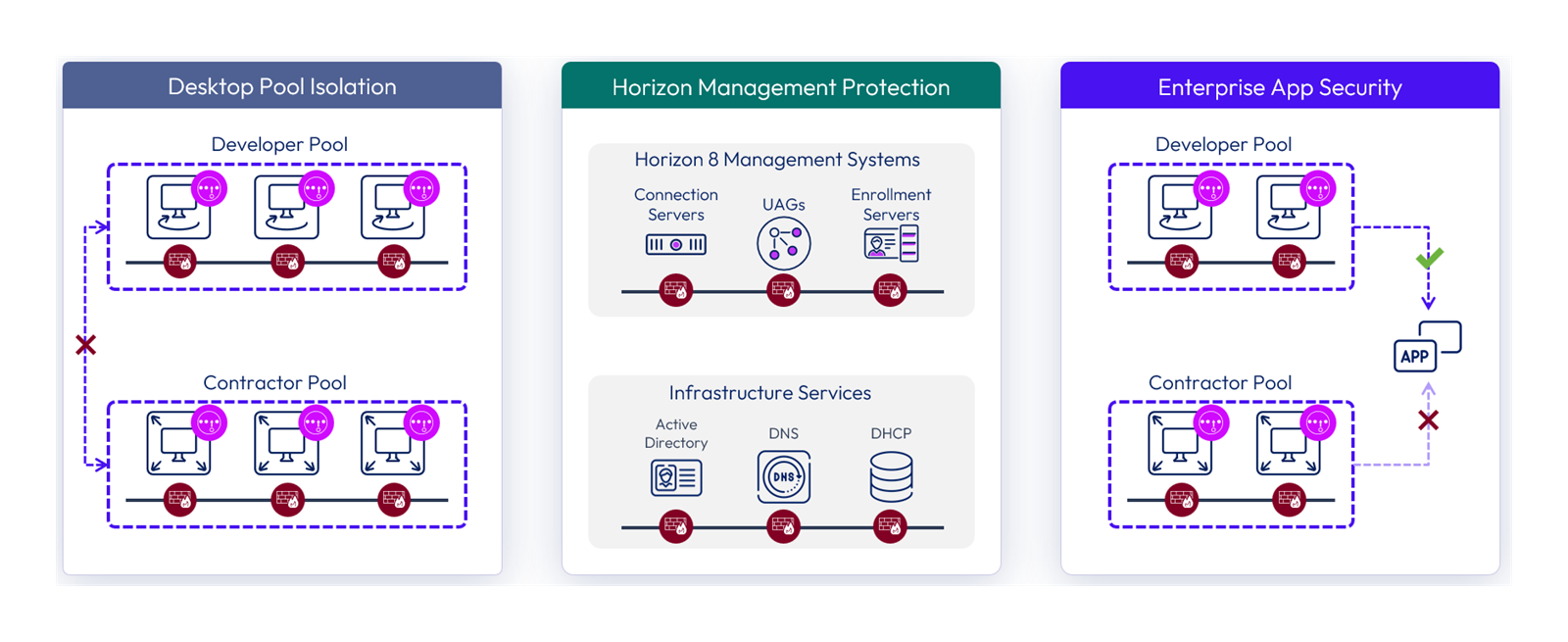
“Interpreting network separation regulations and handling audits is a burden”
Desktop pool isolation · Protection of management components · Business app access control (diagram courtesy of Omnissa)Pool configurations by type, based on the different blocking points of internet and business network separation
Components
The Five Components of Horizon
Horizon is not a single product but a set of components that work together: desktop delivery, app delivery, access paths, display protocol and endpoint security. Below are the role of each component and the decisions Softworks makes for each.
01
Instant Clone
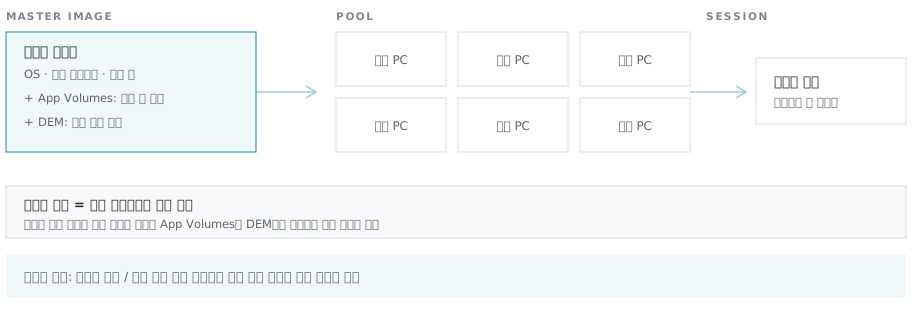
Create desktops from a single master image
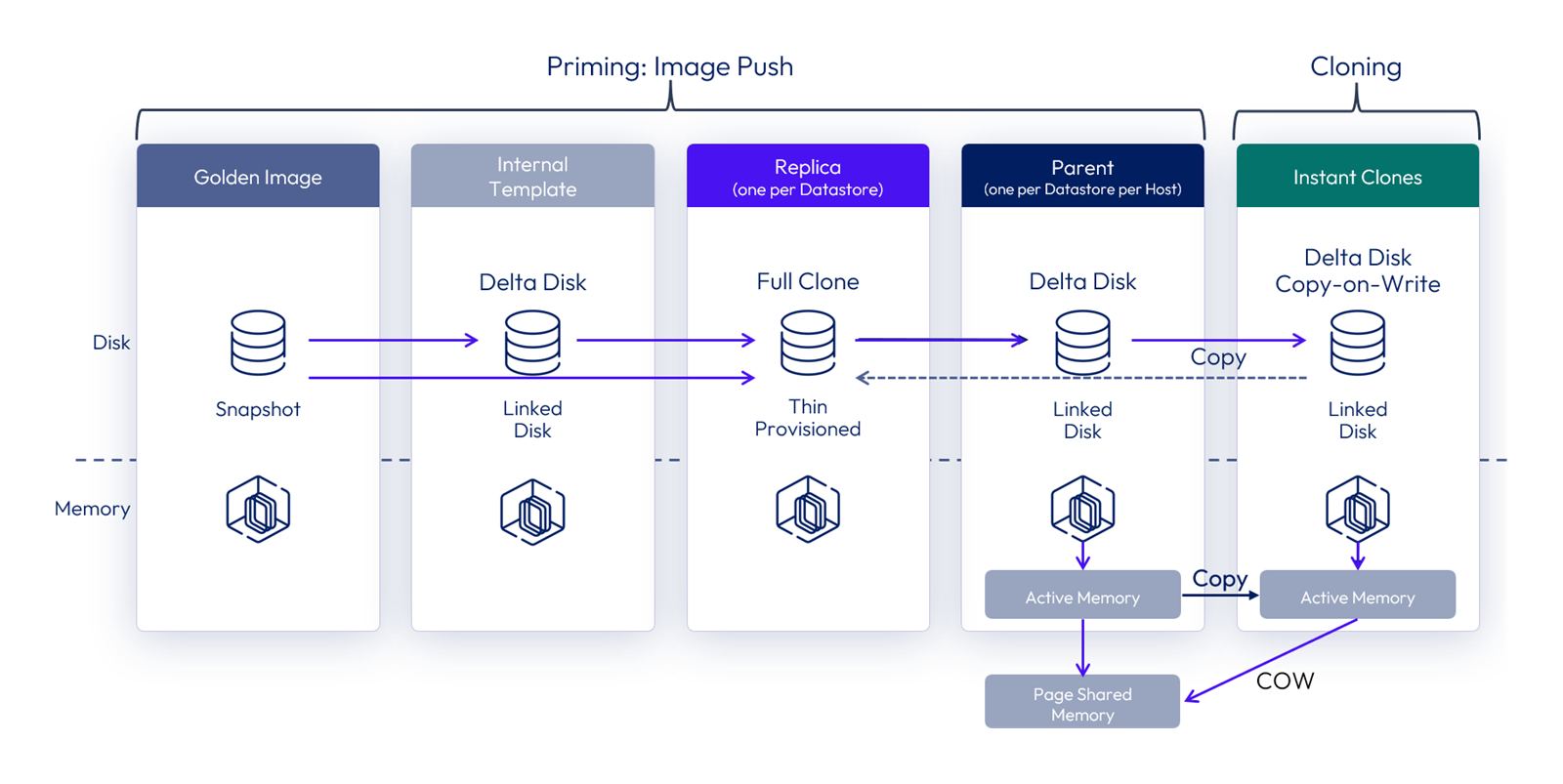
Desktops are created in under a minute by sharing memory and disk with a parent VM, and are reset to their initial state at logoff. When the image is updated, the change applies to all users at their next login.
How disk and memory branch separately from the master image to an Instant Clone (diagram courtesy of Omnissa)Flow for creating and refreshing desktop pools from a master image with Instant Clone
What Softworks Does
Deciding which applications go into the master image and which are delivered as RDSH published apps determines how hard the environment is to operate. We finalize application lists and policies for each business group first, then design the number of images.
02
App Virtualization · RDSH
Servers with identical app configurations form a farm and are delivered as individual sessions
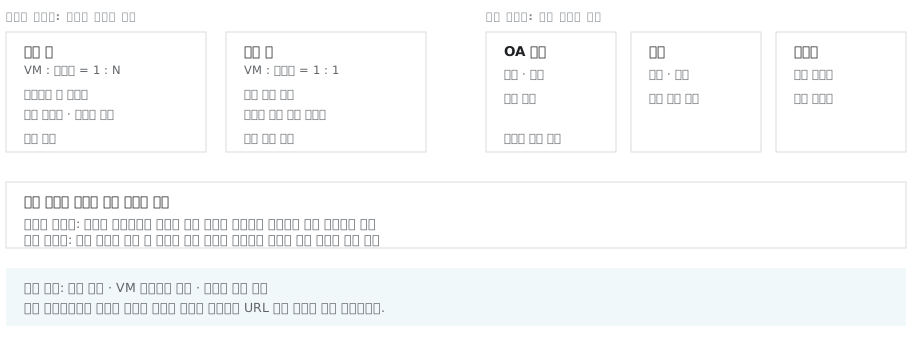
An RDS farm is a group of Windows Server hosts with identical app configurations, on which published application pools and session-based desktop pools are built. Because many user sessions run on one server OS, per-user OS and memory overhead is lower than with dedicated desktops. Apps that do not support multiple instances cannot run in multi-session mode, so Isolated App Launch is used to create a separate session for each app launch. Like desktop pools, farms are created from a golden image with Instant Clone and can be refreshed to their original state or replaced with a new image.
RDS farm structure with app combinations as farm boundaries, and application pool and published desktop pool configuration
What Softworks Does
Before design begins, we finalize a list of workloads that will move to farms and those that will stay on dedicated desktops. For each target app, we first verify support and behavior on Windows Server and check for configuration or file path conflicts when multiple sessions run on the same host, recording the results in a validation report. For apps that fail these checks, we decide app by app whether to use isolated launch or move them to dedicated desktops. Because app combinations define farm boundaries, we build an app combination matrix first to determine the number of farms and golden images, and we finalize the maximum sessions per host through PoC/BMT rather than relying on reference assumptions. Cost estimates include the Microsoft RDS CALs and RD Licensing server required separately from Horizon, including the choice of per-user or per-device mode.
03
UAG · Access Authentication
External access through controlled paths
Unified Access Gateway receives external connections in the DMZ and relays them to internal Connection Servers. Authentication and encryption are handled at the gateway, without exposing the internal network directly.
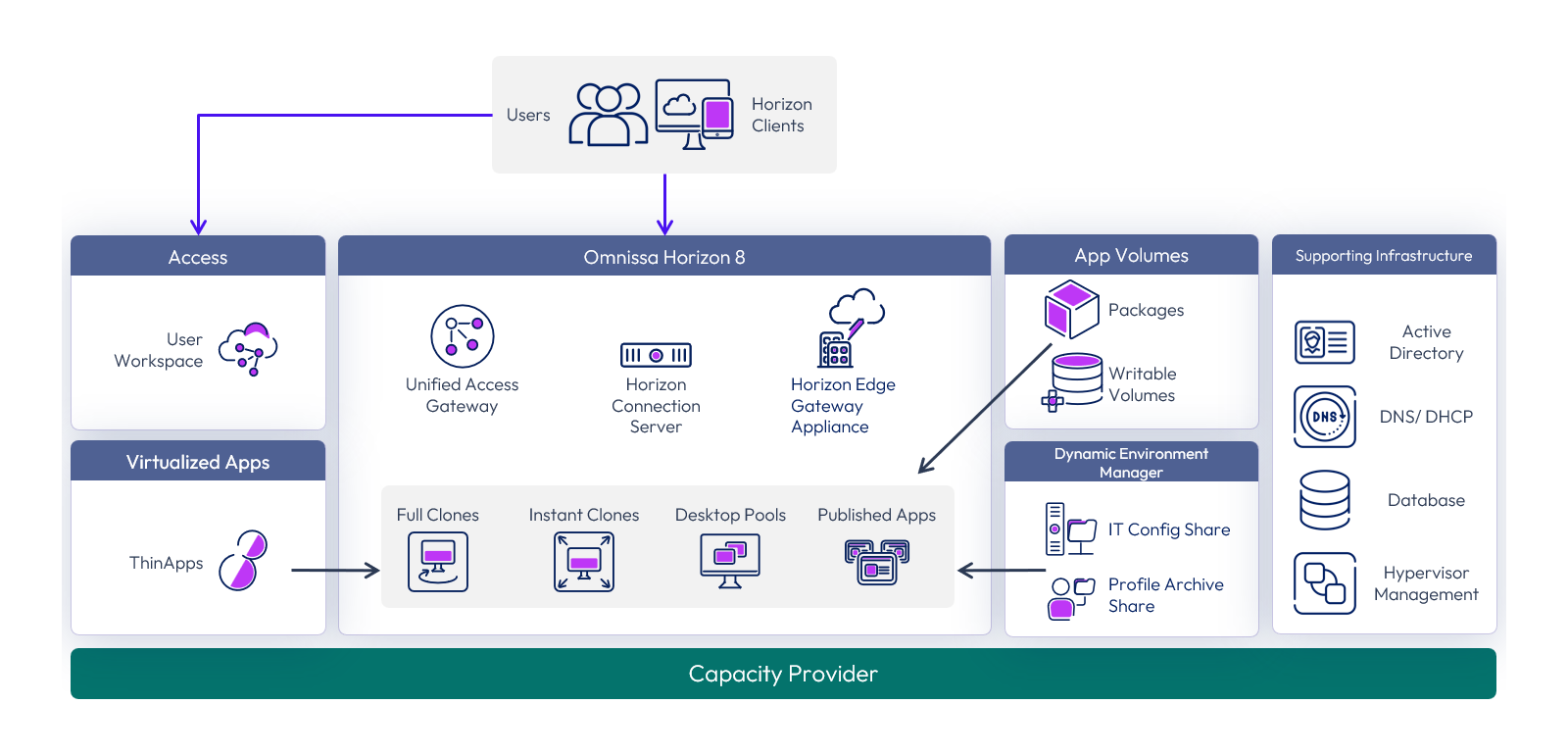
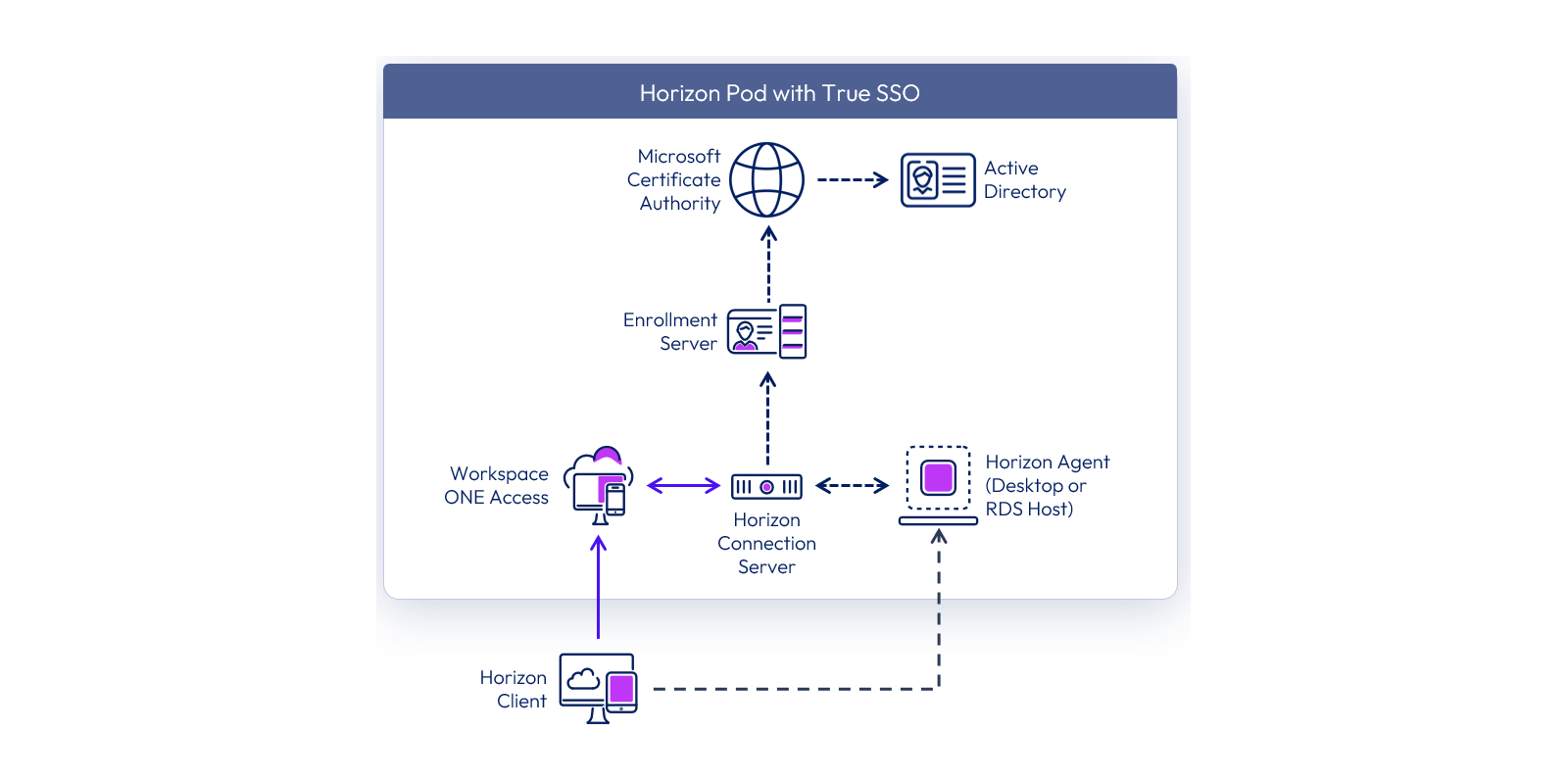
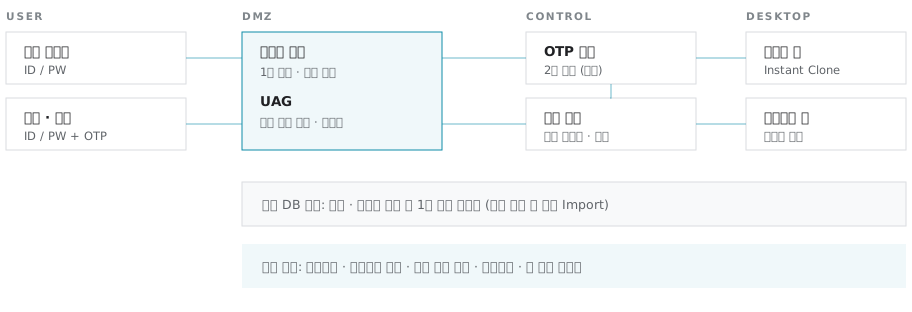
Horizon 8 logical architecture (diagram courtesy of Omnissa)True SSO architecture that issues certificates so users can log in to desktops without re-entering passwordsAccess flow: portal, two-factor authentication, Connection Server and desktop assignment
What Softworks Does
We design the flow from portal access to primary authentication, OTP second-factor authentication, Connection Server and desktop assignment around the customer's authentication framework. Conditional policies, such as applying OTP only to external users, are also decided at this stage.
04
Blast Extreme
Keeps screen delivery running even on low-quality connections
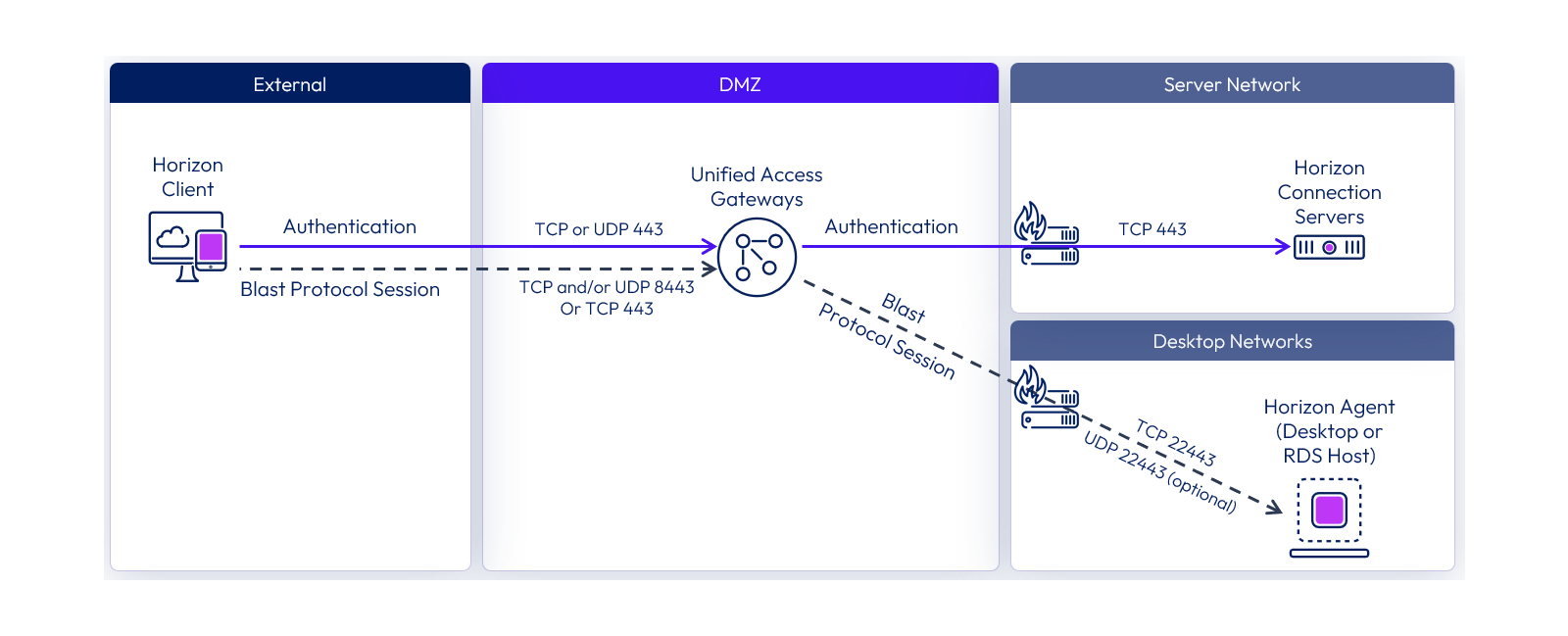
A dedicated remote display protocol that adjusts codec and transport to line quality. When line quality drops, it lowers image quality to keep sessions responsive. In GPU-equipped environments, encoding is offloaded to the GPU.
Blast ports that must be opened per segment for external access (diagram courtesy of Omnissa)An adaptive design that adjusts codec, image quality and encoding path to line quality
What Softworks Does
We separate groups with different network conditions, such as branch offices, home and mobile, and set protocol policies and bandwidth baselines for each. Baselines are finalized by measuring perceived performance on the actual lines before deployment.
05
Security Policy
No data left on endpoints
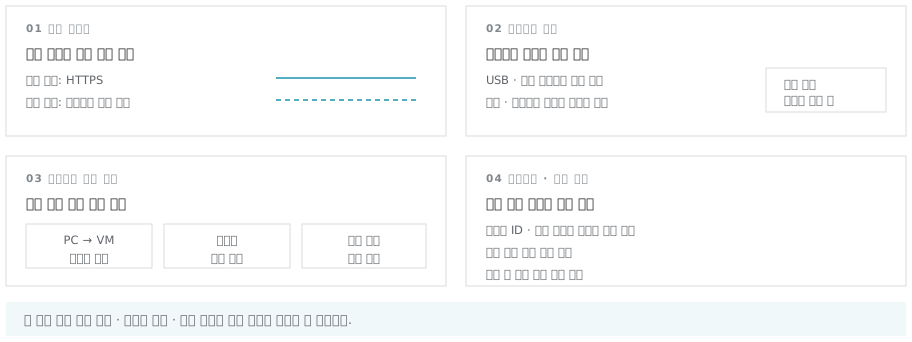
Clipboard control, USB and other peripheral control, screen capture prevention and watermarking, and end-to-end encryption are applied as policies.
Four security controls: in-transit encryption, peripheral devices, clipboard and watermarking
What Softworks Does
We map controls to the Electronic Financial Supervisory Regulations and public sector network separation guidelines, and integrate with a portal so file transfers in and out go through an approval process. Audit evidence deliverables are included.
SourceDiagrams are from the Omnissa Tech Zone public reference architecture (Horizon 8 architecture). The vendor's original diagrams are included as published, with only the resolution adjusted; the diagrams below them were redrawn by Softworks based on its deployments in Korea.
Solution at a Glance
Omnissa Horizon
Omnissa Horizon is a digital workspace platform that delivers virtual desktops and applications from on-premises to the cloud.
Flexible deployment options · Leak prevention with no data on endpoints · Instant Clone image management · Same experience on any device, anywhere · Network separation · Smart work · Engineering VDI · App virtualization · RDSH · Desktop DR
References
Customer References
Customer Type
Projects
Deployment Scale
Finance · Life Insurer
Business-network VDI redeployment and expansion
1,000VM
Finance · Foreign Bank
Business VDI deployment
100VM
Finance · Payment Company
Company-wide internet network separation VDI deployment and expansion
150VM
Public · Research Institute
Remote and work-from-home system deployment
50VM
Finance · Securities
Internal desktop virtualization redeployment
400VM
Public Sector · Energy Public Enterprises
Remote work virtualization system expansion
500VM
Public · Research Institute
Smart work system (VDI) deployment
50VM
Public · Education Administration Agency
Virtual desktop infrastructure expansion
600VM
Finance · Securities
VDI deployment for network-separated infrastructure
1,000VM
Operation & Support
The first three months after cutover determine whether VDI takes hold
User inquiries peak right after a VDI cutover. The engineers who performed the deployment serve as the point of contact after cutover, and support continues until your operations team can manage the environment on its own.
Tiered Level 1 / 2 / 3 incident response
Joint response with the vendor and specialists for complex incidents
Hands-on training for operators and users, with training videos
Expansion and redesign consulting
Desktop DR configuration (standby site failover procedures and failover testing)
We combine solutions from global technology leaderswith Softworks' deployment and operations expertiseto power our customers' digital and AI transformation.