VMware vSphere Foundation (VVF) · Enterprise Virtualization & Infrastructure Platform

Before an ambitious private cloud,
build a solid virtualization foundation

vSphere Foundation 9 (VVF 9) combines vSphere, vCenter, vSAN ESA, and advanced unified operations management to provide a standard enterprise virtualization infrastructure as the foundation for private cloud. For the past 12 years, Softworks has been on the front line deploying this virtualization layer. We clearly separate what you need now from a future expansion to VCF, and design the most practical VVF 9 architecture without overinvestment.

Why Softworks

How Softworks approaches VMware vSphere Foundation

01

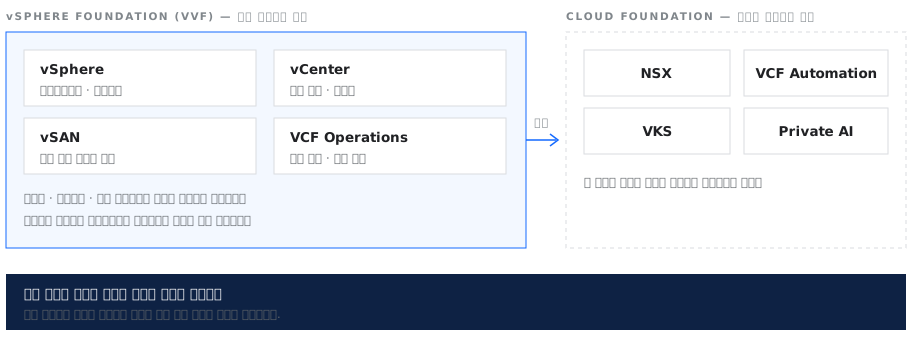
We find the right boundary between VVF and VCF for each customer

With the product lineup simplified after the Broadcom restructuring, it has become harder to judge how much your organization actually needs. Softworks does not push a full-stack deployment by default. We assess actual usage in your current environment and your expansion plans for the next 2–3 years, then determine whether a lean vSphere Foundation (VVF) configuration fits or an enterprise-wide cloud on Cloud Foundation (VCF) is needed, and propose the right architecture.

The scope of vSphere Foundation and where it extends into Cloud Foundation
02

Start at the scale you need now and expand flexibly as your business grows

Even if you start with standard virtualization (VVF), you should be able to expand naturally to a full-stack private cloud (VCF) by adding network virtualization and automation layers as your business grows. How you design the initial network and storage architecture greatly affects the effort and cost of later expansion. Softworks configures your initial infrastructure with future cloud expansion in mind, opening the most efficient path to growth.

03

Designed to the scope that is easiest to manage for the people who will run it

An overly complex infrastructure may seem fine at first, but it easily leads to management gaps and operational failures when staff change or a handover takes place. Softworks does not stop at deployment. We first examine the size and skill level of the team that will actually run the infrastructure, and propose the right system scope so operations stay stable even when staff change.

Scope of Work

From assessment to operations: what Softworks covers

Assess

Assessment

Assessment of the current virtualization environment · workload inventory · license impact analysis · review of edition selection criteria

Design

Design

Cluster design · vSAN storage policies · Redundancy and availability design · Backup/DR integration design · Expansion scenarios

Build

Deployment

Installation and standard configuration · VCF Operations setup · Security baseline application (CIS and agency guidelines) · Performance validation

Migrate

Migration

Physical server consolidation (P2V) · Migration from existing virtualization · Phased transition plan and rollback criteria

Operate

Operations

Operations handover · Administrator training · Routine inspection framework · Technical support onboarding

Knowledge Base

12 years of deployment data for a proven architecture without trial and error

The many variables and complex decisions in a virtualization deployment are ground Softworks has already covered and validated many times. We have captured 12 years of design criteria, incident resolution history, and performance tuning values in our own Knowledge Base. New projects do not start from a blank page. We apply proven deployment know-how immediately to deliver infrastructure quickly and reliably.

  • 12 yearsof virtualization deployment project experience
  • Finance · Public · ManufacturingTrack record with industry-specific regulatory requirements
  • Standard design setsArchitecture references for every scale

Accumulated Assets

  • Assessment checklist (cumulative revisions)
  • Resource usage baselines by scale
  • Standard architecture references by scale
  • Redundancy configuration pattern set
  • P2V candidate selection criteria
  • Security baseline set (CIS and agency guidelines)
  • Performance and failure test scenarios
  • Operations handover documentation standards
Field Issues

Four problems we often see in the field

Challenges in the FieldThe Softworks Approach
“It's hard to decide which edition to choose”We review your current workloads and future plans to determine whether vSphere Foundation covers what you need. If network virtualization and self-service will be needed at some point, we design the transition plan around that point with you
“We have many aging physical servers that need consolidation”We classify consolidation candidates by resource usage pattern and identify workloads likely to lose performance after virtualization first. After selection, we migrate in phases, with rollback criteria for each phase.
“We haven't decided whether to keep our external storage or move to vSAN”We first check the remaining service life and maintenance contract terms of your external storage and the I/O characteristics of your workloads. You can also keep external storage and stand up the virtualization layer first, so we compare cost and downtime to decide whether to transition when the hardware is replaced or switch over all at once.
“We're not sure we can upgrade to Cloud Foundation later”We design the initial configuration with the expansion path in mind. Setting up cluster boundaries and network configuration to scale from the start reduces the scope of later work
Components

The four components of vSphere Foundation

vSphere Foundation combines the virtualization layer, storage, and unified operations management in a single solution. Below are the key functions of each core component, along with the professional services and engineering support Softworks provides for a successful deployment.

01

vSphere · vCenter

Configure the virtualization layer and management tools

It consists of the hypervisor and a central management tool, and pools resources into clusters to manage virtual machine placement and availability.
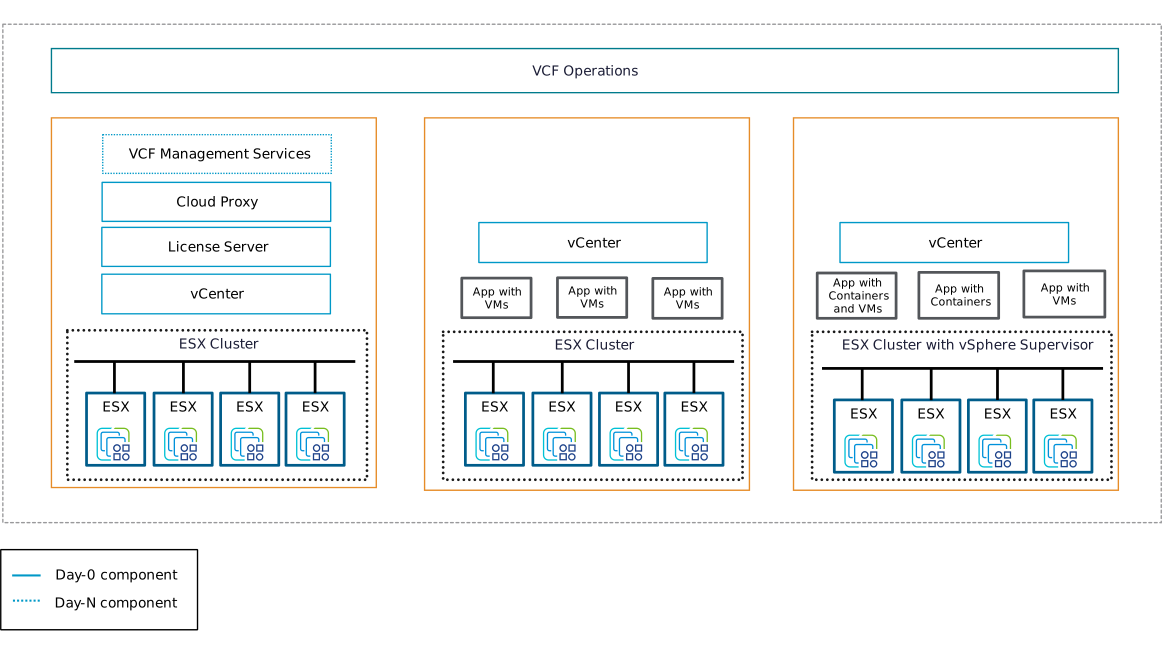
vCenter groups ESX clusters, and VCF Operations manages multiple vCenter instances together
What Softworks Does

A single large cluster is simple to manage, but a failure can affect a wider scope. Softworks reviews the business criticality of your workloads and the level of availability you can tolerate during an outage, and proposes an efficient cluster separation architecture that minimizes failure risk.
02

vSAN

Turn servers' internal disks into shared storage

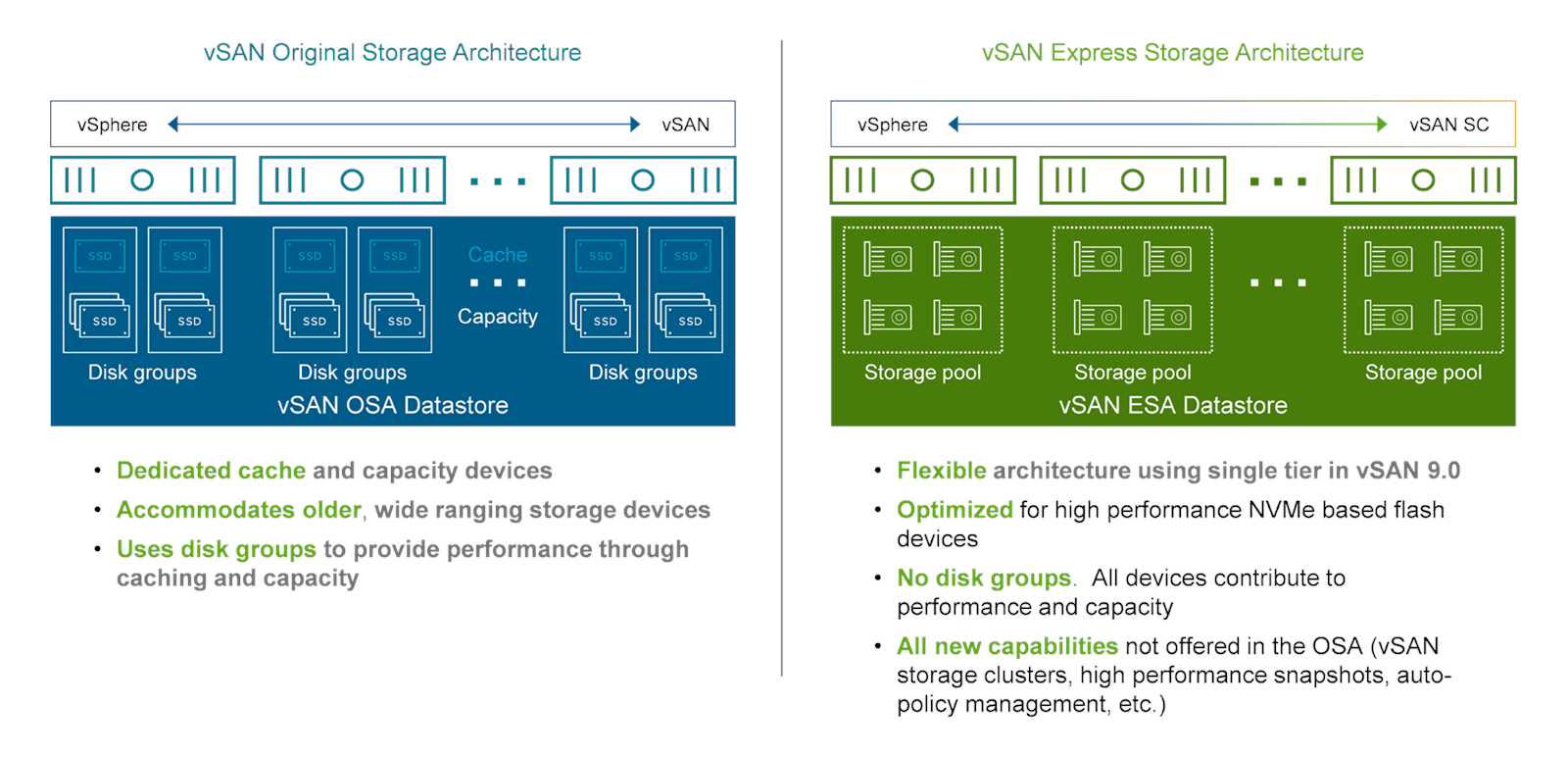
Software-defined storage that pools the disks installed in servers into shared storage. Storage policies (FTT · encryption · deduplication) are applied per virtual machine.

OSA uses disk groups with a cache tier; in ESA, every disk contributes to capacity
What Softworks Does

With vSAN, usable storage capacity depends on the initial node count and the failures-to-tolerate (FTT) setting. Softworks calculates the minimum number of nodes for the capacity you need and recommends an architecture that scales naturally as nodes are added, without reworking the existing configuration.

03

VCF Operations

View resource usage and status in one console

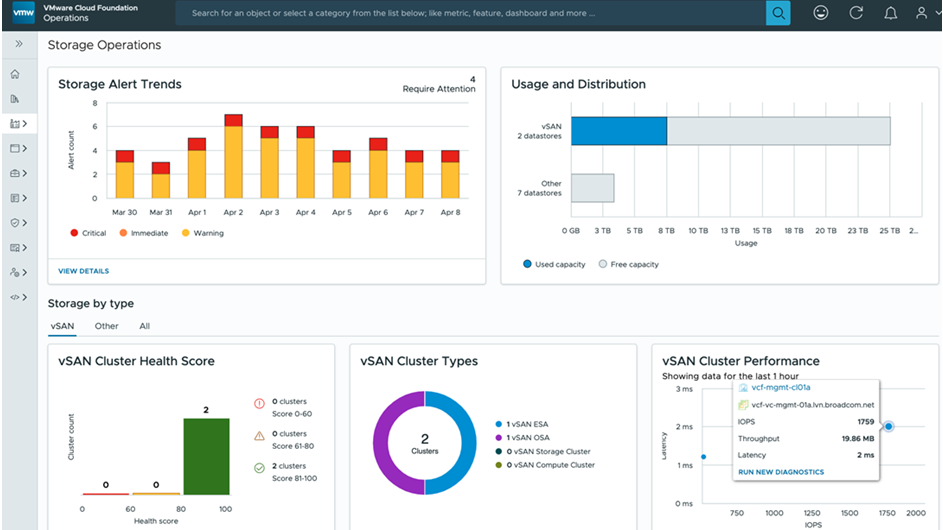
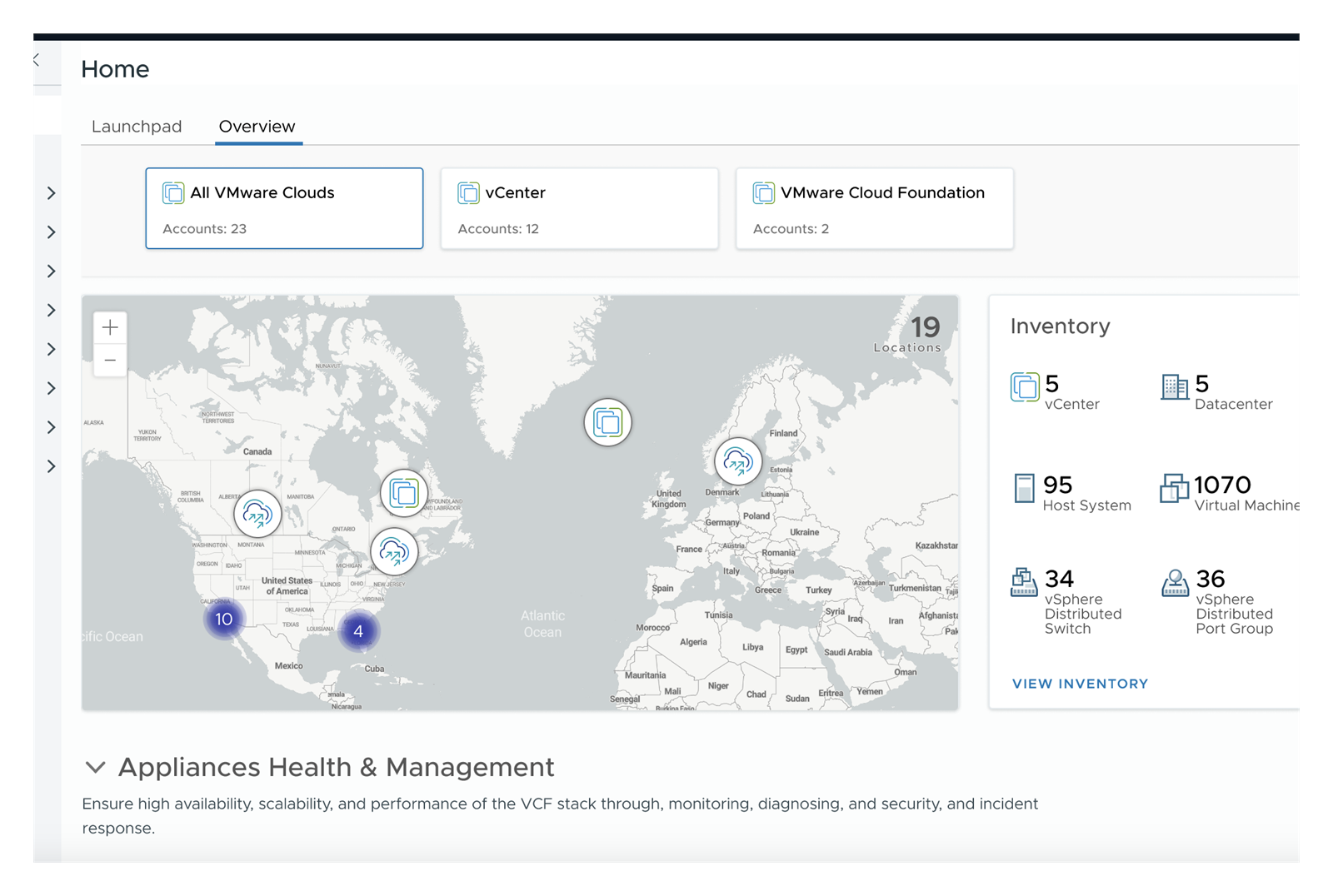
Collects and displays resource utilization, capacity trends and performance anomalies for hosts and virtual machines. Trends show when expansion is needed.

The operations console home screen, bringing together vCenter instances, hosts, and virtual machines across multiple sites
A dashboard showing storage alert trends and vSAN cluster utilization on one screen
What Softworks Does

Instead of many complex screens, we build a single intuitive dashboard centered on the capacity trend metrics essential for expansion and operations decisions. For the first three months after deployment, we fine-tune routine check items and alert thresholds with you, so that anyone can run the system reliably even with a small team or a change of staff.

04

Deployment · Lifecycle

Installation and upgrades follow standard procedures

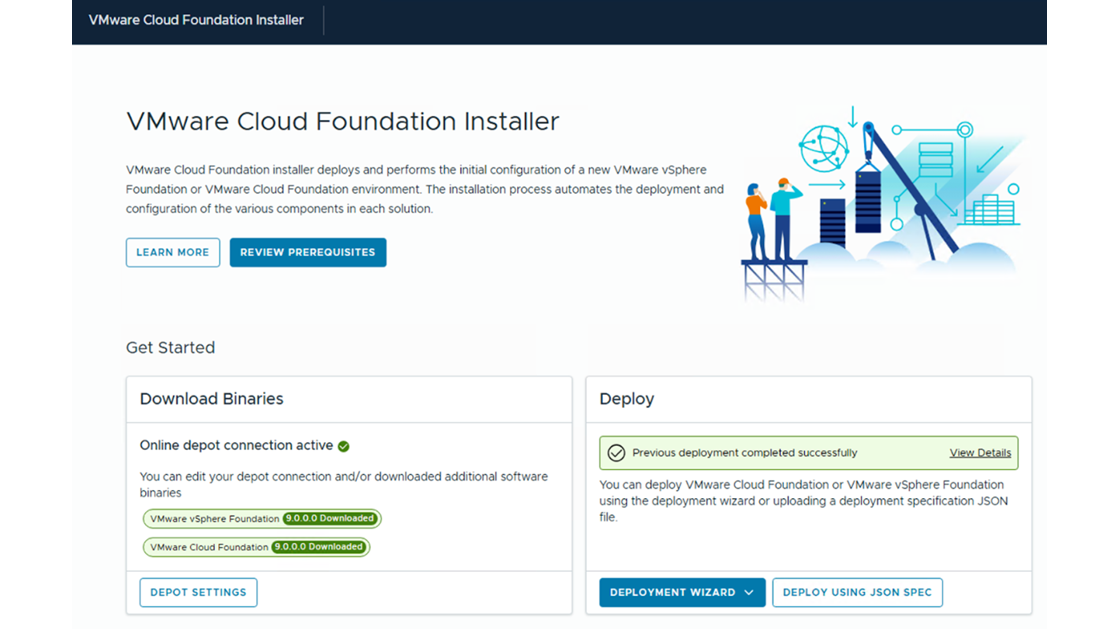
Components are deployed through the installer using a consistent procedure, and patches and upgrades follow the same path.

The installer's first screen, where you verify the downloaded binaries and launch the deployment wizard
What Softworks Does

Infrastructure upgrades happen more often during operations than at initial deployment. Softworks writes upgrade procedures from the deployment stage, documents the task sequence and clear rollback criteria in case of problems, and supports you through handover.

SourceThe diagrams and screenshots used to describe the components are from Broadcom's publicly available technical documentation. Screenshots are examples and may differ by version.

References

Customer References

Customer TypeProjectsDeployment Scale
Finance · BankNew vGPU configuration and vCenter security patching project1,000+ virtual machines
Enterprise · Shipping and Logistics IT CompanyRoot cause analysis and recovery for virtualization incidentsAbout 700 virtual machines
Finance · Fintech CompanyMigration of existing virtual machines and storage to a new system20+ physical servers
Finance · Savings BankPhysical server virtualization project50 existing physical servers
Finance · Shared Financial IT InstitutionNext-generation system deployment project20+ physical servers
Enterprise · Materials and Components ManufacturerPrivate cloud deployment project50+ physical servers
Operation & Support

Technical support continues after deployment

The life of your infrastructure is determined by how it is run after deployment. The engineers who deployed it remain your technical support contact.

  • Routine inspections and health checks
  • Patch and upgrade technical support
  • First-level incident analysis and vendor escalation
  • Annual architecture review
  • License renewal and resizing support

We combine solutions from global technology leaders with Softworks' deployment and operations expertise to power our customers' digital and AI transformation.

Build your virtualization foundation, starting with exactly what you need

We start together by assessing your current virtualization environment and determining whether VVF or VCF fits.

Request a Consultation →